Skip to content

Platform

Everything the system does — in one place.

A due-diligence reference for the people who evaluate before they recommend. Every item here ships today; roadmap is labelled as roadmap.

Core capabilities

Twenty-eight modules, six domains.

The product groups its modules the way a company is actually organised — Home, Sell, Operate, Money, People, and Serve & Govern, with a workspace group for settings, roles, audit, and the developer platform. Fifty-five application screens sit underneath.

Home

The workspace dashboard: what needs attention now, across every domain a person has permission to see.

Sell — CRM & pipeline

Leads with scoring, a drag-and-drop deal pipeline with WIP limits per stage, and customer records behind both.

Sell — quotes & invoices

Quotes raised against the customer record and converted to invoices, so the commercial trail stays in one place.

Operate — projects

Projects with a budget and a health state, tasks and owners underneath, and spend compared against what was agreed.

Operate — inventory

Stock with days of cover computed from real movement, plus reorder suggestions derived from it.

Operate — procurement & assets

Suppliers and purchase orders, and an asset register where depreciation is applied by the system.

Money

A finance cockpit for net cash, budget burn against elapsed pace, and flagged expenses — with the accounting journal underneath.

People

HR directory and employee records, payroll runs with payslips, and a recruitment pipeline in the same workspace.

Serve & Govern

Helpdesk with sentiment and SLA tracking, a knowledge base, a document library, and a contracts register.

Computed from your data

An answer, and the working behind it.

The copilot is not a language model and does not write prose about your business. It runs real queries against your workspace database and returns a computed answer together with its basis — the window it looked at, the record counts, and the calculation used.
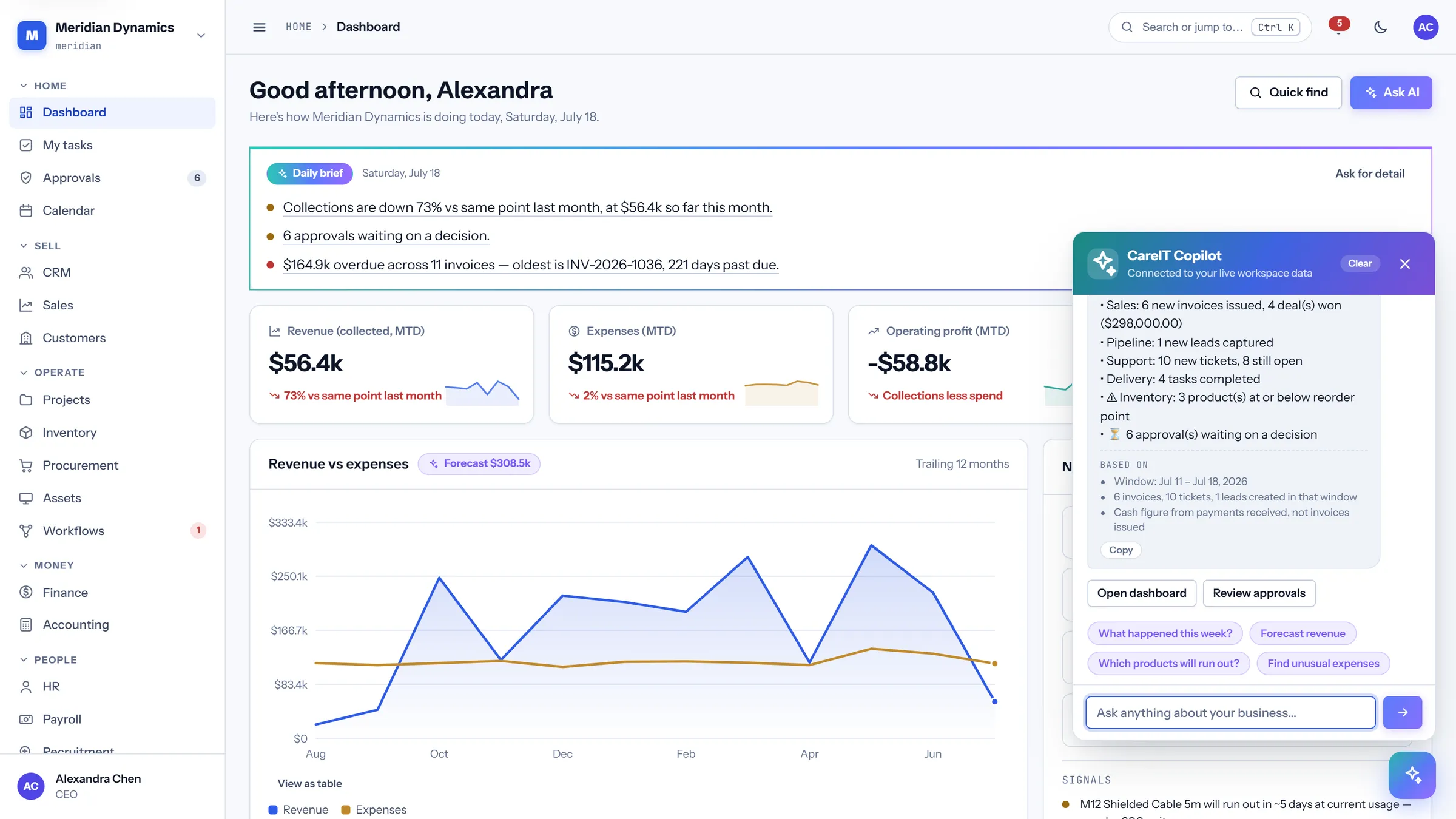
  • Every answer is computed from your live data, not generated from a trained model
  • The basis is shown with the result: window, record counts, and the basis of the figure
  • It cannot hallucinate a number, because it has no way to produce one that is not in your database
  • No per-question credits and no usage meter — there is no third-party model bill behind it
  • It respects the same permission matrix as the rest of the product: it can only compute over what you may already see
CareIT Business OS AI copilot answering a question with the computed figure and the basis it was derived from
AI copilot — actual product UI

Workflow automations

Build the process, then watch it run.

Automations are built visually on a pan-and-zoom canvas rather than written as rules in a settings page — and every execution is recorded, so an automated step can be inspected after the fact instead of merely trusted.
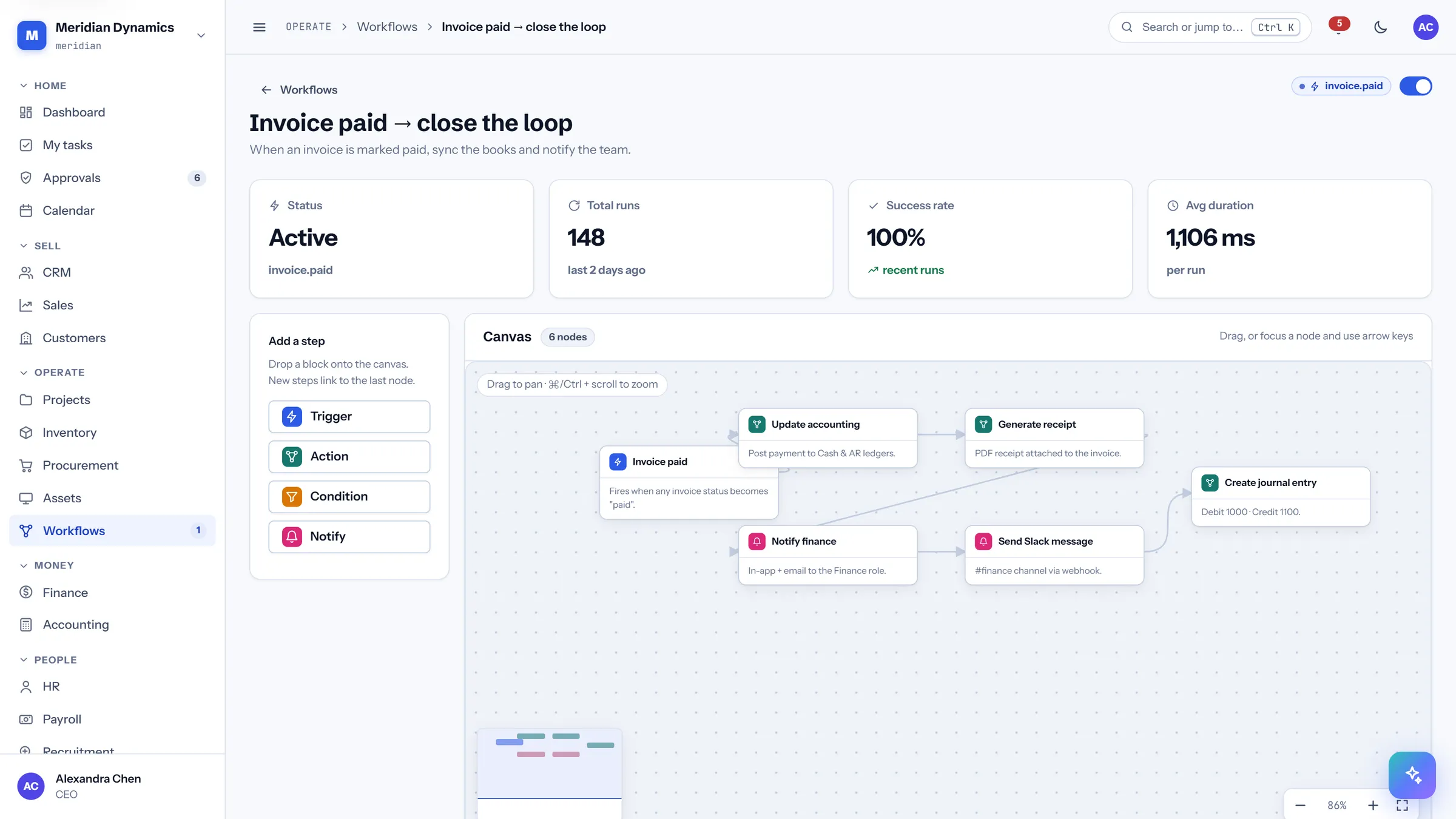
  • A pan-and-zoom canvas for laying out the steps of a process visually
  • Run history for every execution — what fired, when, and what it did
  • Approval chains and thresholds are configuration, not custom code
  • A transactional outbox guarantees that events queued for delivery are actually delivered
  • Webhook secrets are stored encrypted
CareIT Business OS workflow automation canvas with connected steps on a pan and zoom surface
Workflow canvas — actual product UI

Reporting & analytics

The numbers, in a shape you can hand over.

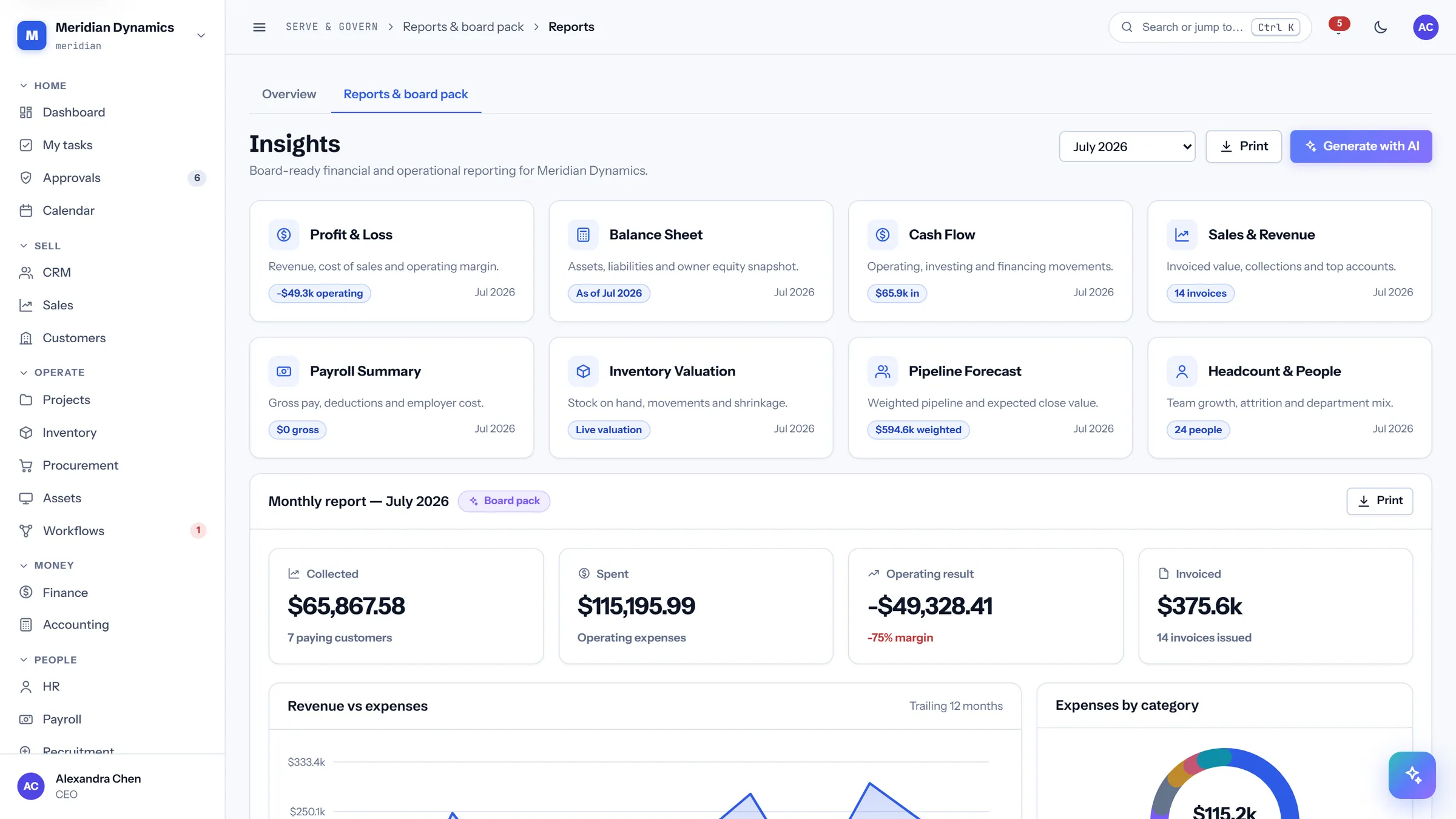
Reporting is built for the meeting it ends up in. The board pack is print-optimised, the finance cockpit compares burn against elapsed pace rather than against a flat budget line, and analytics reads from the same records everything else writes to.
  • Finance cockpit: net cash, budget burn against elapsed pace, and flagged expenses
  • Reports and a board pack laid out for print, not just for a screen-share
  • Analytics over the same live records the operational modules write
  • The accounting journal sits underneath, so a reported figure traces to entries
  • The REST API exposes the same data for your own reporting stack
CareIT Business OS reports screen showing a print-optimised board pack layout
Reports & board pack — actual product UI

In depth

The details evaluators ask about.

Access & permissions

Access is a matrix, not a job title.

Roles are assembled from a permission matrix of module against view and manage, so what somebody can do is a stated position in a grid rather than an assumption about their title.

  • A role permission matrix covering every module, split into view and manage
  • Workspace-scoped login, and workspace-scoped password reset with it
  • Two-factor authentication with authenticator apps (TOTP), with the MFA secret stored encrypted
  • Navigation is role-aware: people see the modules their permissions allow

Audit & integrity

A log that can be checked, not just read.

An audit log is only worth what it can prove. This one is append-only and chained with SHA-256, and there is a command that re-walks the chain to confirm nothing in it has been altered.

  • Append-only audit log, chained with SHA-256
  • A verification command that re-walks the chain end to end
  • Readiness and integrity check commands for the deployment itself
  • Full data export on request — the workspace’s records are yours to take

Money

One set of books under the operational modules.

Finance is not a separate reconciliation exercise. Invoices, purchase orders, payroll runs, and asset depreciation land in the same accounting journal the reports are built from.

  • Finance cockpit with net cash, budget burn against elapsed pace, and flagged expenses
  • Accounting journal underneath the operational modules that feed it
  • Payroll runs producing payslips, in the same workspace as the HR directory
  • Asset depreciation applied by the system rather than maintained by hand

Documents & contracts

Uploads are scanned before they are stored.

Document handling is where a business platform quietly becomes a distribution point for malware. Uploads here are virus-scanned synchronously, and an infected file is never written to storage in the first place.

  • Synchronous virus scanning on upload — infected files are never stored
  • A document library with structure and retention rules set at implementation
  • A contracts register alongside it, so the agreement and its documents stay together
  • A knowledge base for the internal answers people keep re-asking

API & platform

Everything the UI does, the API does.

The application is a client of a documented REST API, and the developer platform is part of the product rather than an upgrade — with the safety properties that matter for machine-driven writes built in.

  • REST API v1 authenticated with Bearer tokens
  • A required Idempotency-Key on writes — a retried request never applies twice
  • Encrypted webhook secrets, and a transactional outbox for guaranteed event delivery
  • Security headers applied at the platform level

Shipped vs roadmap

What’s real today — and what’s next.

We keep this split honest on purpose: everything in the left column is built, tested, and demonstrable on a live instance. The right column is planned, not promised on a date.

Shipped today
  • All 28 modules across Home, Sell, Operate, Money, People, and Serve & Govern
  • The AI copilot, computing answers from your live data with the basis shown
  • Visual workflow automations with a run history for every execution
  • Append-only audit log chained with SHA-256, plus its verification command
  • REST API v1 with Bearer tokens and a required Idempotency-Key on writes
  • Synchronous virus scanning on document upload, and encrypted webhook and MFA secrets
Roadmap
  • Single sign-on (SSO / SAML)
  • An offline-capable client
  • E-signature on quotes and contracts
  • Native mobile applications

API-first

Built API-first, so it plays well with others.

Every screen in CareIT Business OS runs on the same REST API you get. Writes require an Idempotency-Key, so a retried request from your integration never applies twice — the property that makes automated posting to invoices, stock, and payroll safe to build on.

  • REST API v1 with Bearer tokens
  • Idempotency-Key required on writes
  • Outbound webhooks with encrypted secrets
  • Transactional outbox for guaranteed delivery
  • Full data export on request
  • Your SMTP for email

Roadmap: single sign-on (SSO / SAML), an offline-capable client, e-signature, and native mobile applications.

Open the product guide

See the whole system on a live instance.

A working walkthrough beats any feature list — we’ll drive it with your business in mind.