The whole system, screen by screen — 47 screenshots across 7 areas, captured from the live product. What each module does, and the engineering underneath it.
Every screenshot below is the real product UI — captured
from a live CareIT Business OS instance seeded with a realistic demo
workspace. No mockups, no concepts. Company names and figures are
sample data, never a real customer’s.
Watch it, read it, keep it
The same guide, three ways.
Watch the narrated walkthrough, scroll the screens below, or take the illustrated PDF with you.
Video user guide — every module, narratednarrated · 1080p
CareIT Business OS User Guide — PDF edition
A4 · every module illustrated with the real UI, step by step
Where everyone lands. The dashboard answers "what needs me today" before you go looking, the copilot answers questions in plain language, and the command palette gets you anywhere without touching the sidebar.
/app/dashboard
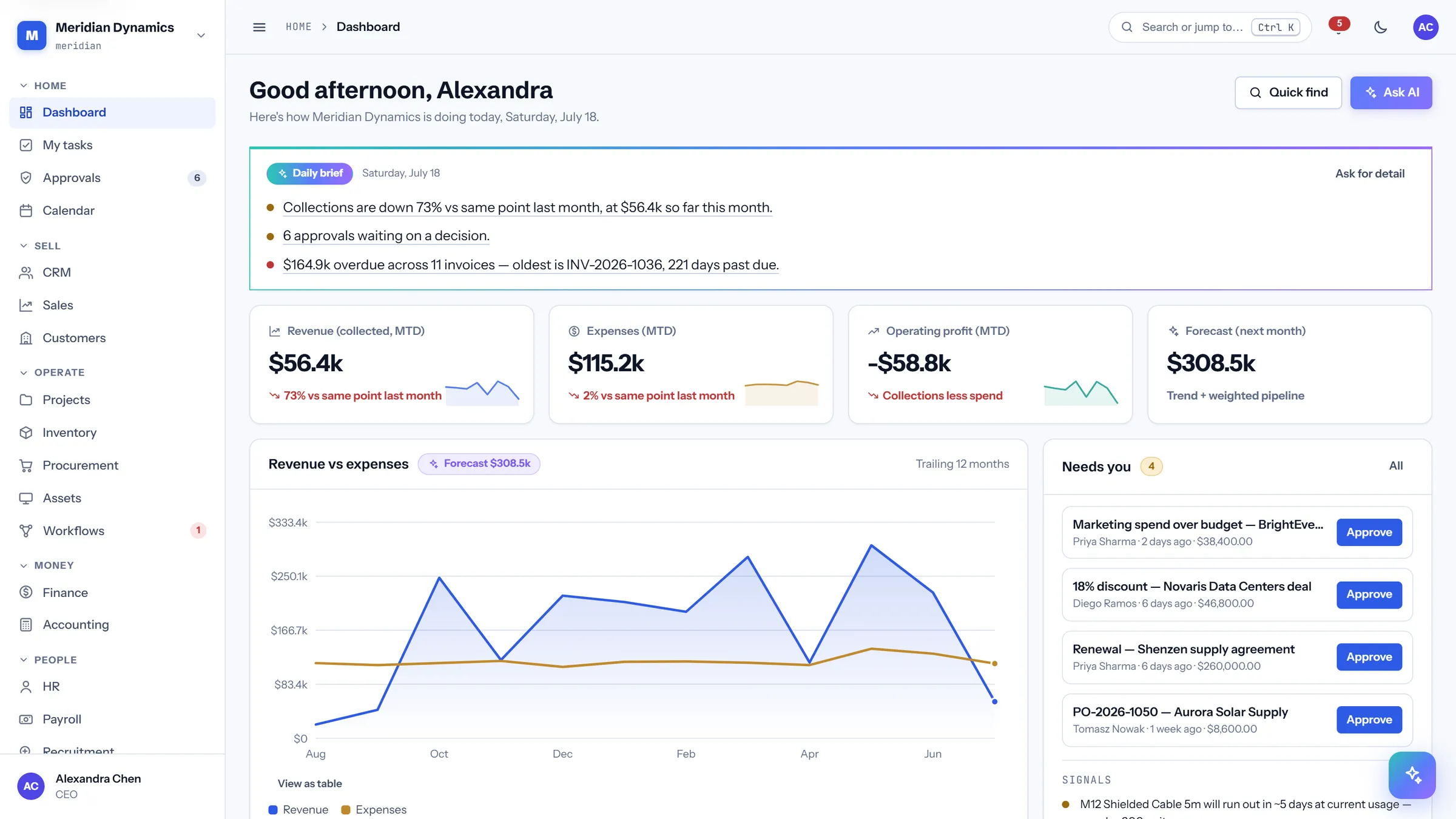
Executive dashboard
/app/dashboard
A role-aware home screen. It opens with an AI daily brief written from today's data, then shows the four metrics your permissions say you care about — a CEO sees financials, a support lead sees the queue.
AI daily brief: computed clauses with deep links to the record behind each one
Role-aware KPI row chosen from eight candidates by permission
"Needs you" approval queue you can decide from without leaving home
Business health indicators that each state their own threshold
/app/dashboard · copilot
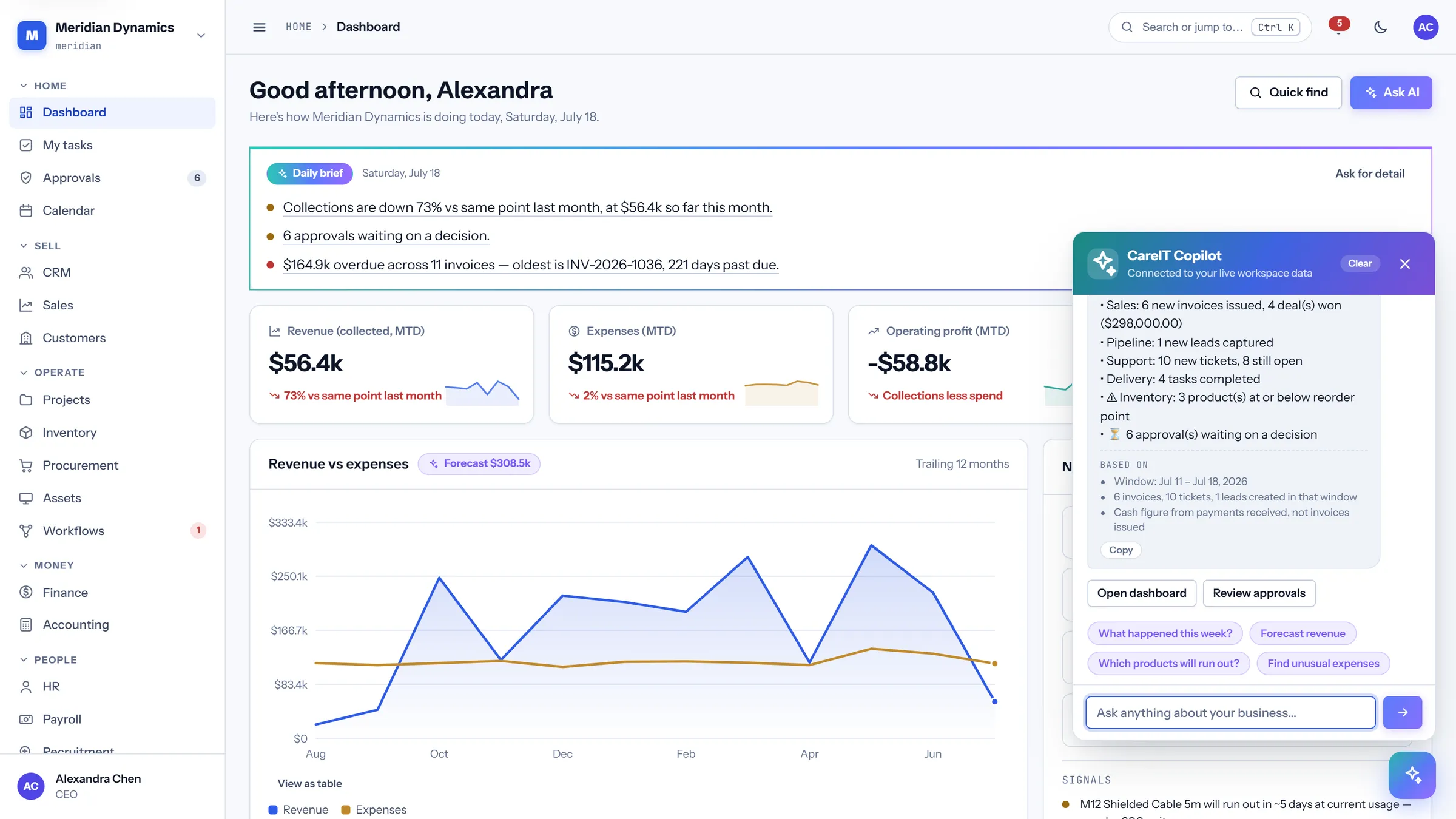
AI copilot
/app/dashboard · copilot
Ask questions about the business in plain language and get an answer computed from your live database — weekly digest, revenue forecast, which products run out next, which expenses look unusual.
Every answer shows its working under "Based on" — the window, the record counts, the basis
Conversation history persists across navigation, so this morning's answer is still evidence this afternoon
Suggested questions to start from, and an Explain button on stat cards that asks about that number
No per-question credits: answers are computed from your data, not billed by a third-party model
Ctrl / ⌘ + K
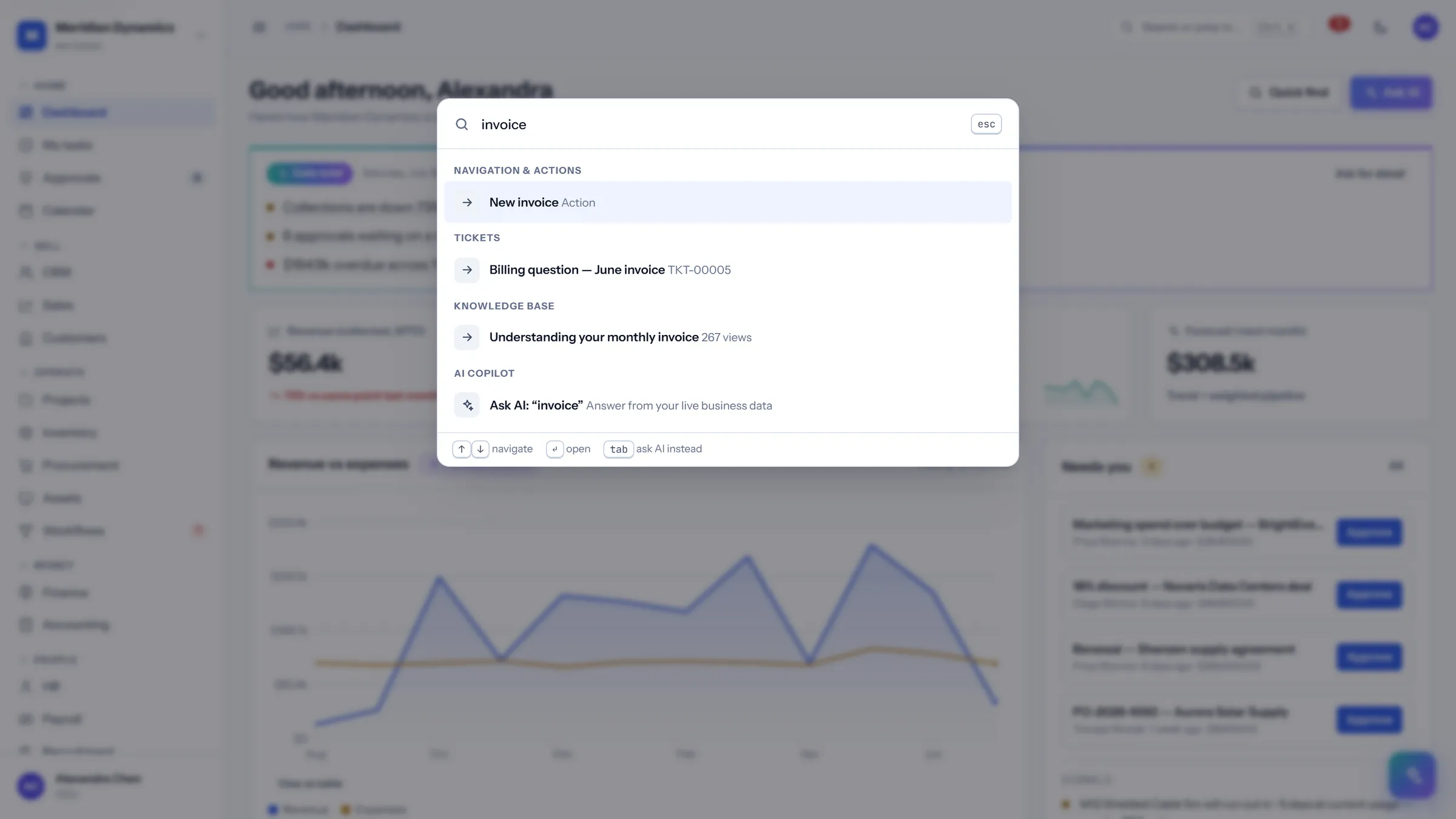
Command palette
Ctrl / ⌘ + K
One shortcut searches across modules — records, actions, knowledge base articles — and can hand the same query to the copilot instead.
Results grouped by source: navigation and actions, tickets, knowledge base, AI
Verbs, not just links — type "approve" and decide the pending items in place
Full keyboard control: arrows to move, Enter to open, Tab to ask AI instead
Recent destinations offered as soon as it opens
/app/approvals
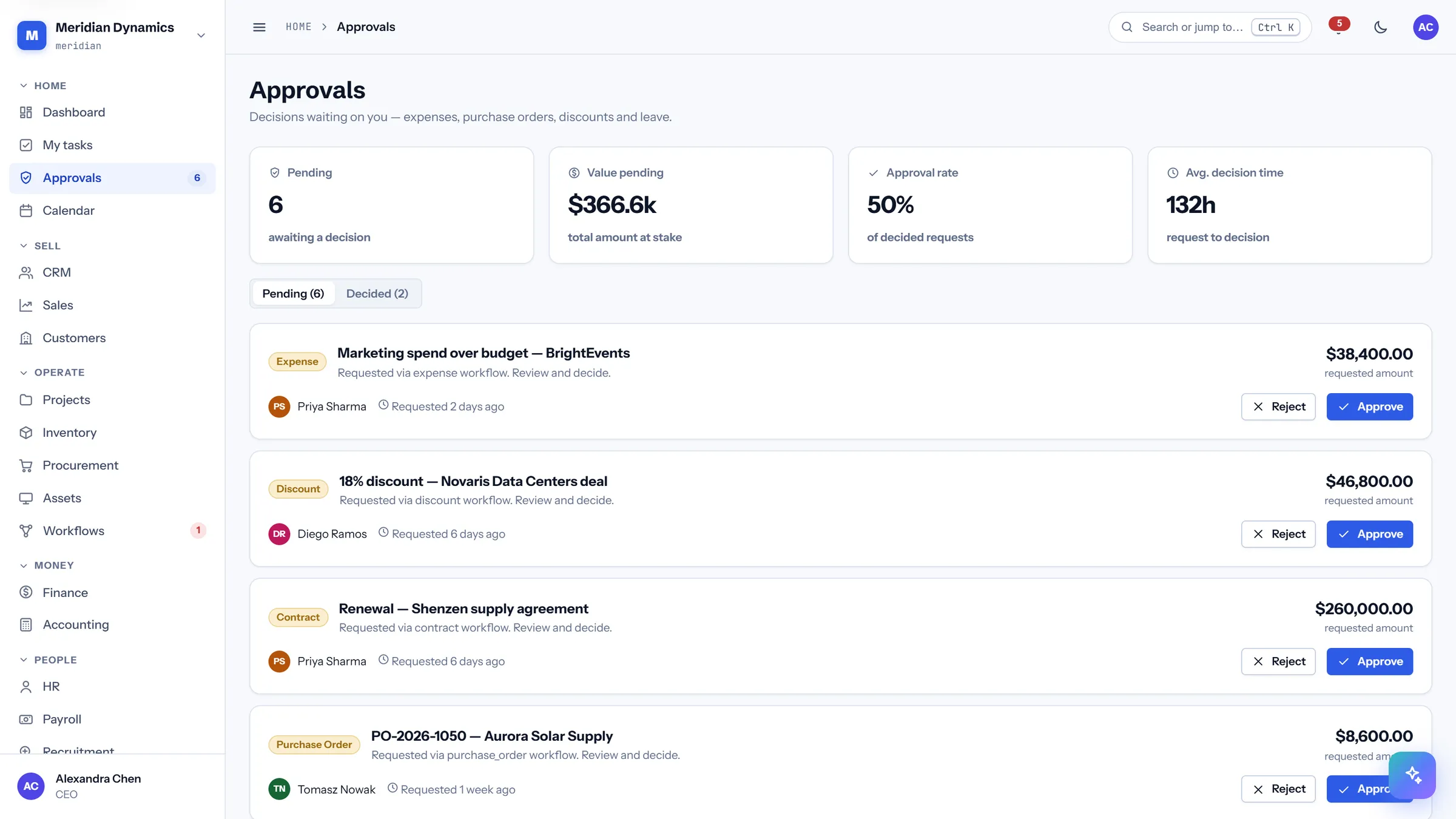
Approvals
/app/approvals
One queue for everything waiting on a decision — discounts, purchase orders, budget overruns, contract renewals — with the value at stake shown up front.
Pending count and total value at stake across all request types
Approval rate and average decision time, so bottlenecks are visible
Rejections prompt for a reason and store it against the record
Approve or reject inline, or straight from the dashboard queue
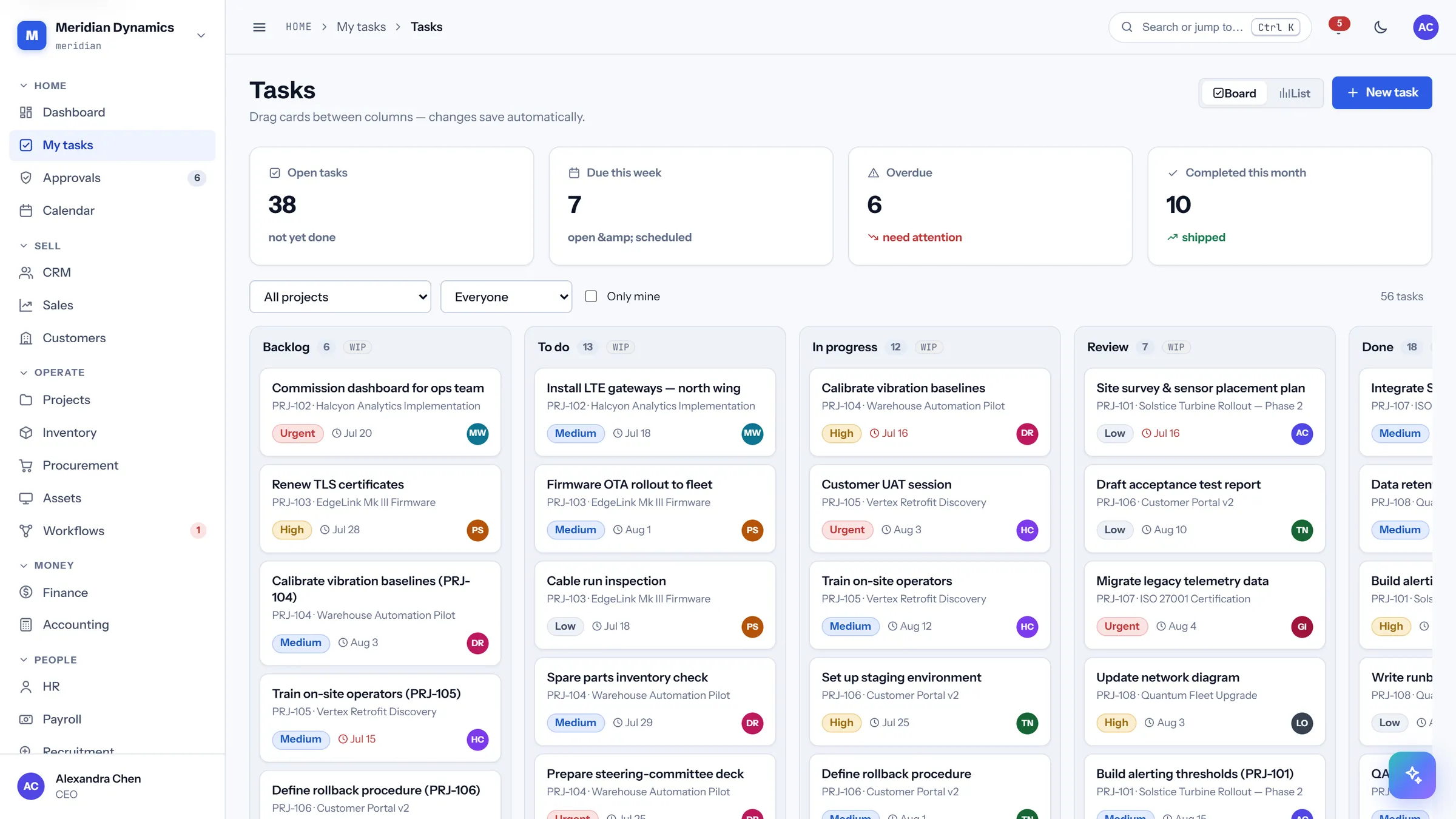
/app/tasks
My tasks
/app/tasks
The personal work queue across every project and module, with overdue work separated from what is merely due.
Open, due this week, overdue, and completed-this-month at a glance
Server-side sorting, so ordering applies across the whole set and not just the page
Task, project, priority, assignee, due date, and status in one row
Saved views remember a filter you use often
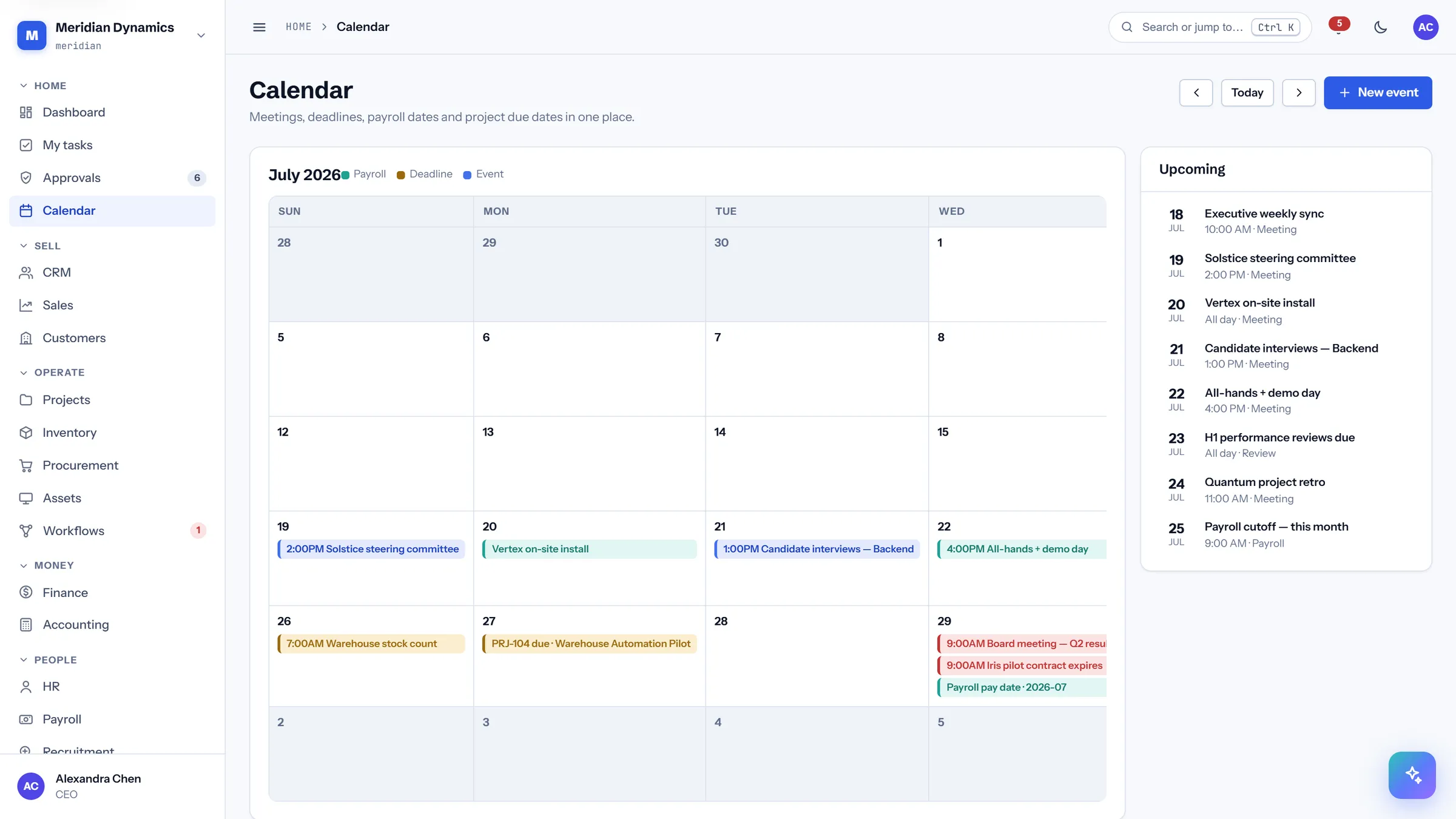
/app/calendar
Calendar
/app/calendar
A month grid of everything dated across the system — meetings, milestones, contract expiries, pay dates — beside a list of what is coming up next.
Month view with events drawn from across the modules
Upcoming list for the near horizon
Events link back to the record that created them
Reads correctly at mobile width
02 · Sell
Sell
From first contact to cash collected: leads and scoring, a drag-and-drop deal pipeline, quotes and invoices, and the customer record that ties all of it together.
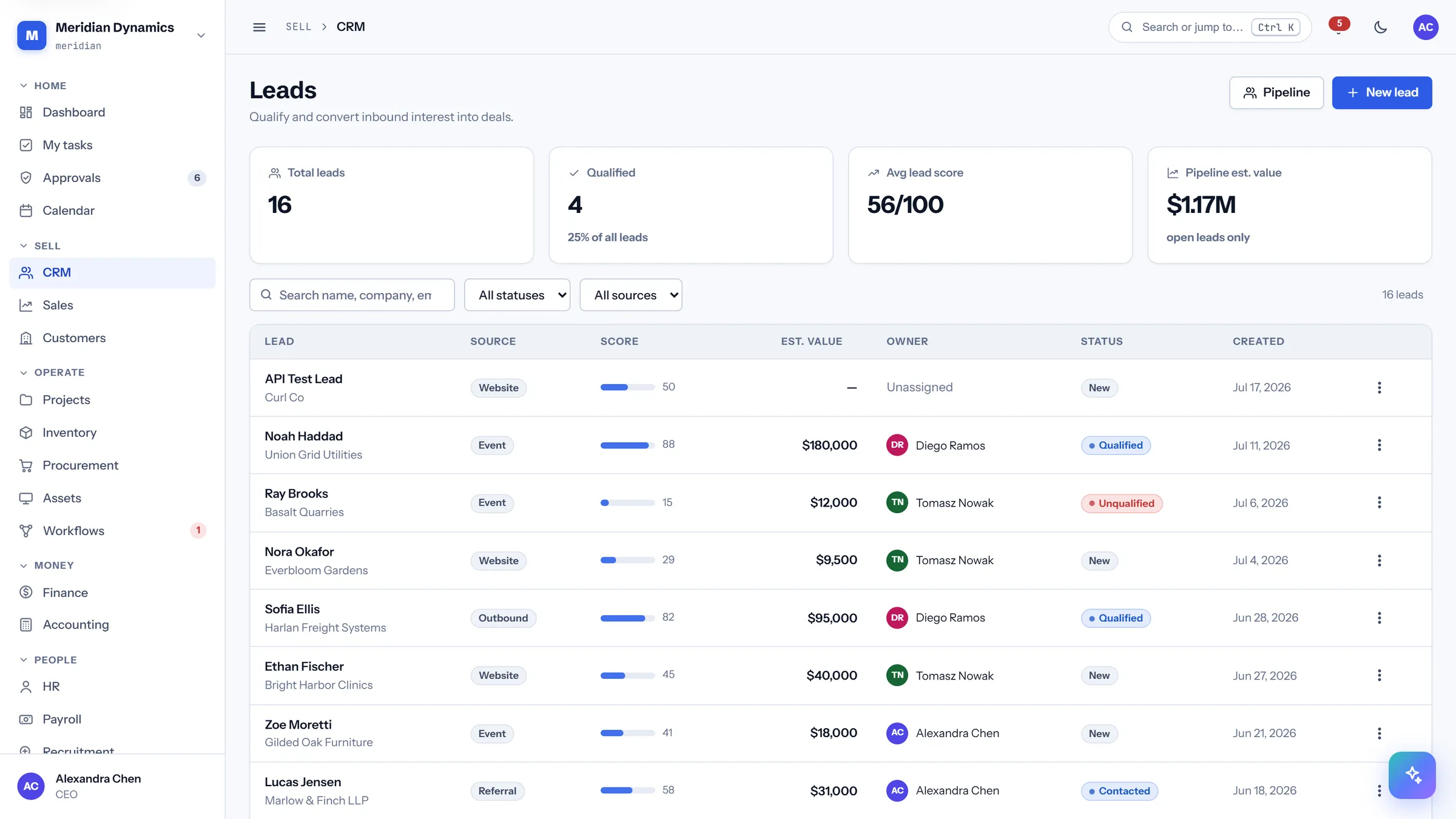
/app/crm
Leads
/app/crm
Every inbound and outbound lead with a score, an owner, and an estimated value, so qualification is a decision rather than a guess.
Lead scoring out of 100 with a qualified-share summary
Estimated pipeline value across open leads only
Source attribution on every lead
Sortable columns backed by a server-side allow-list
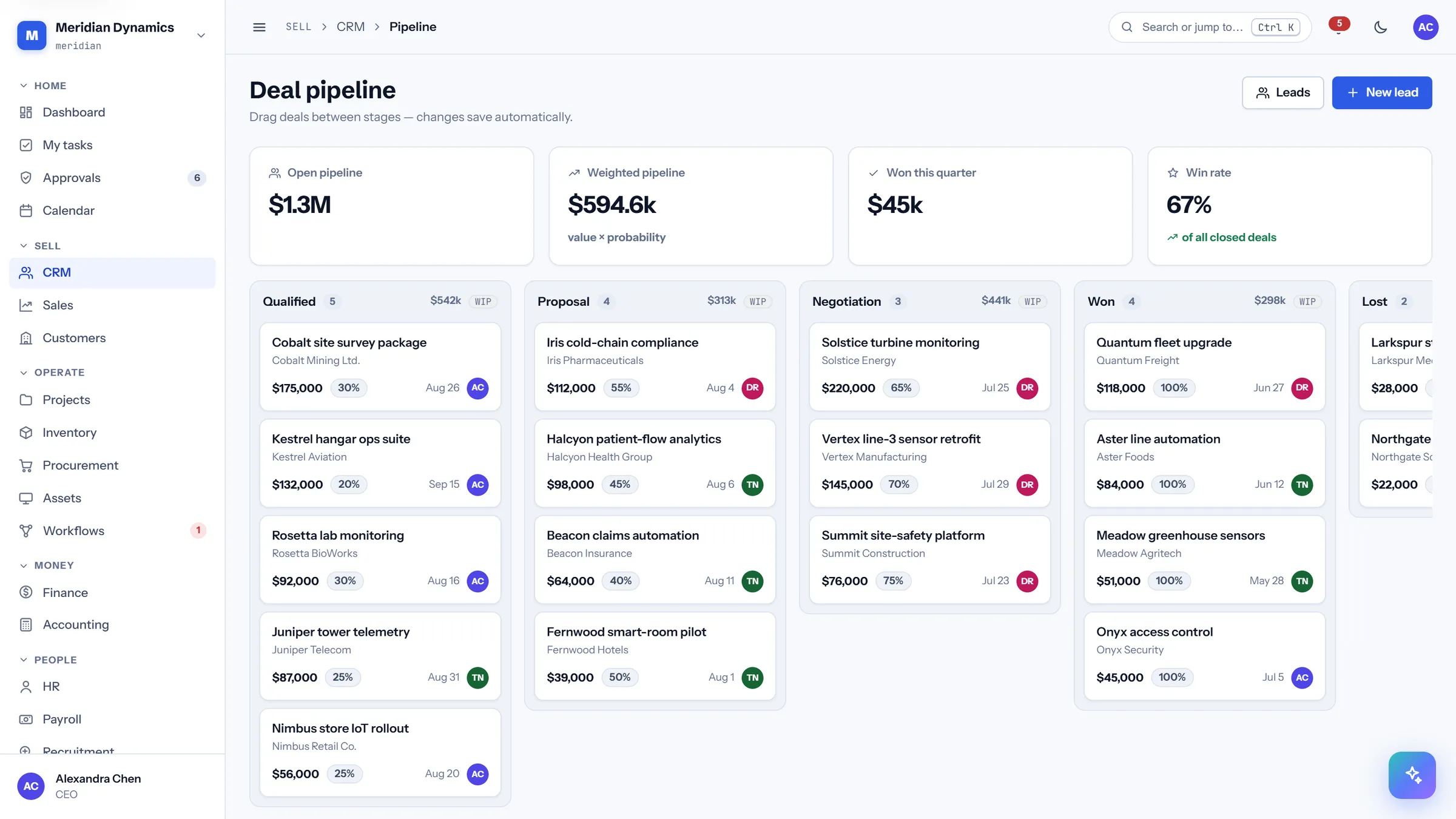
/app/crm/pipeline
Deal pipeline
/app/crm/pipeline
The kanban board sales actually runs on. Drag a deal between stages and the move persists; if the save fails the card returns to where it was rather than leaving a lie on screen.
Open and probability-weighted pipeline totals above the board
WIP limits per stage, set by clicking the column header
Full keyboard moves: Enter to pick up, arrows to choose a stage, Enter to drop
Columns cap at twelve cards with a "show more" rather than scrolling forever
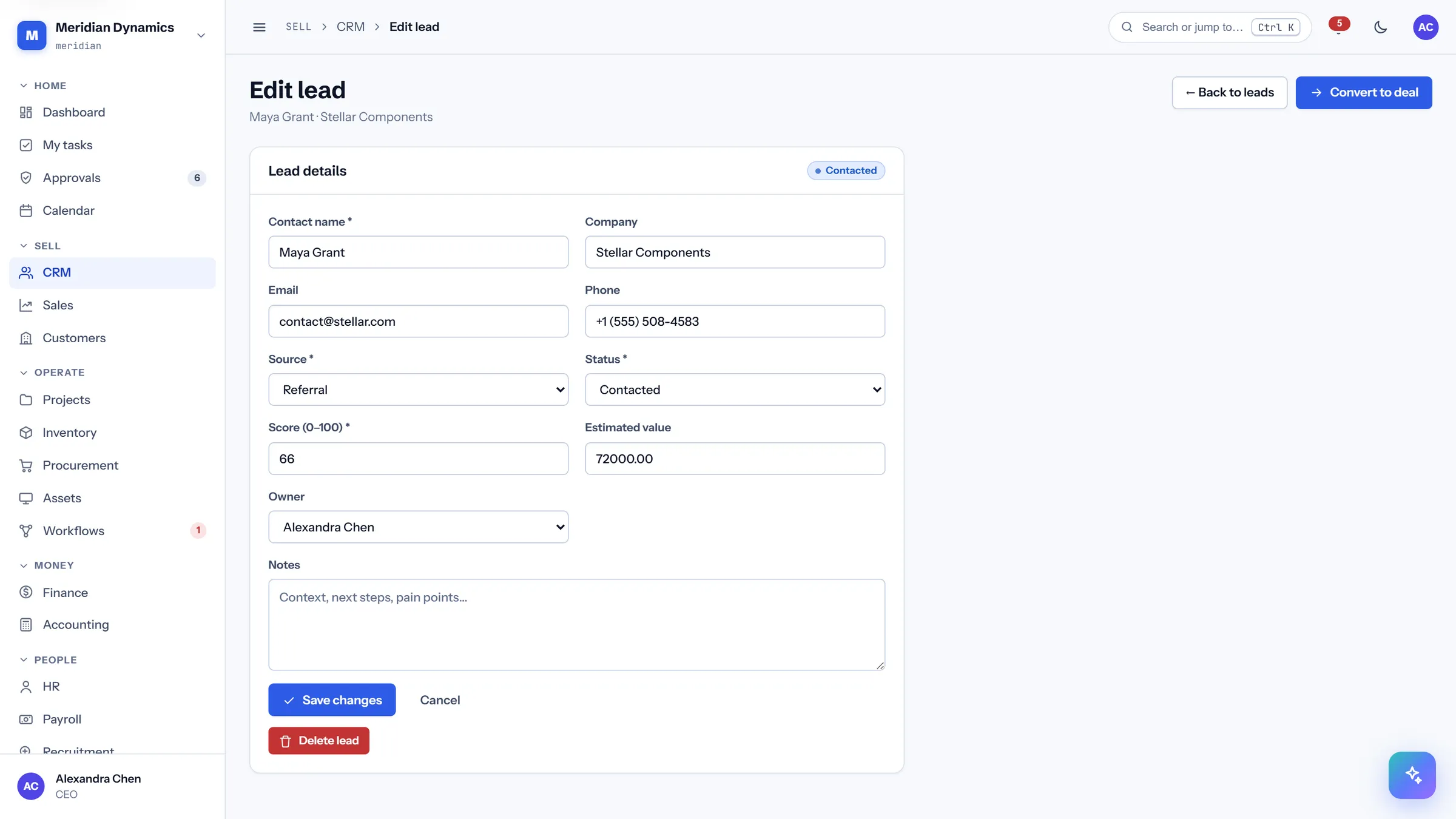
/app/crm/leads/{id}/edit
Lead editor
/app/crm/leads/{id}/edit
The full lead record — contact details, source, score, owner, and status — on one form.
Every field labelled and reachable by keyboard
Status and owner changes are written to the activity trail
Validation errors return in place, with the values you typed still there
Converts to a deal without re-keying the details
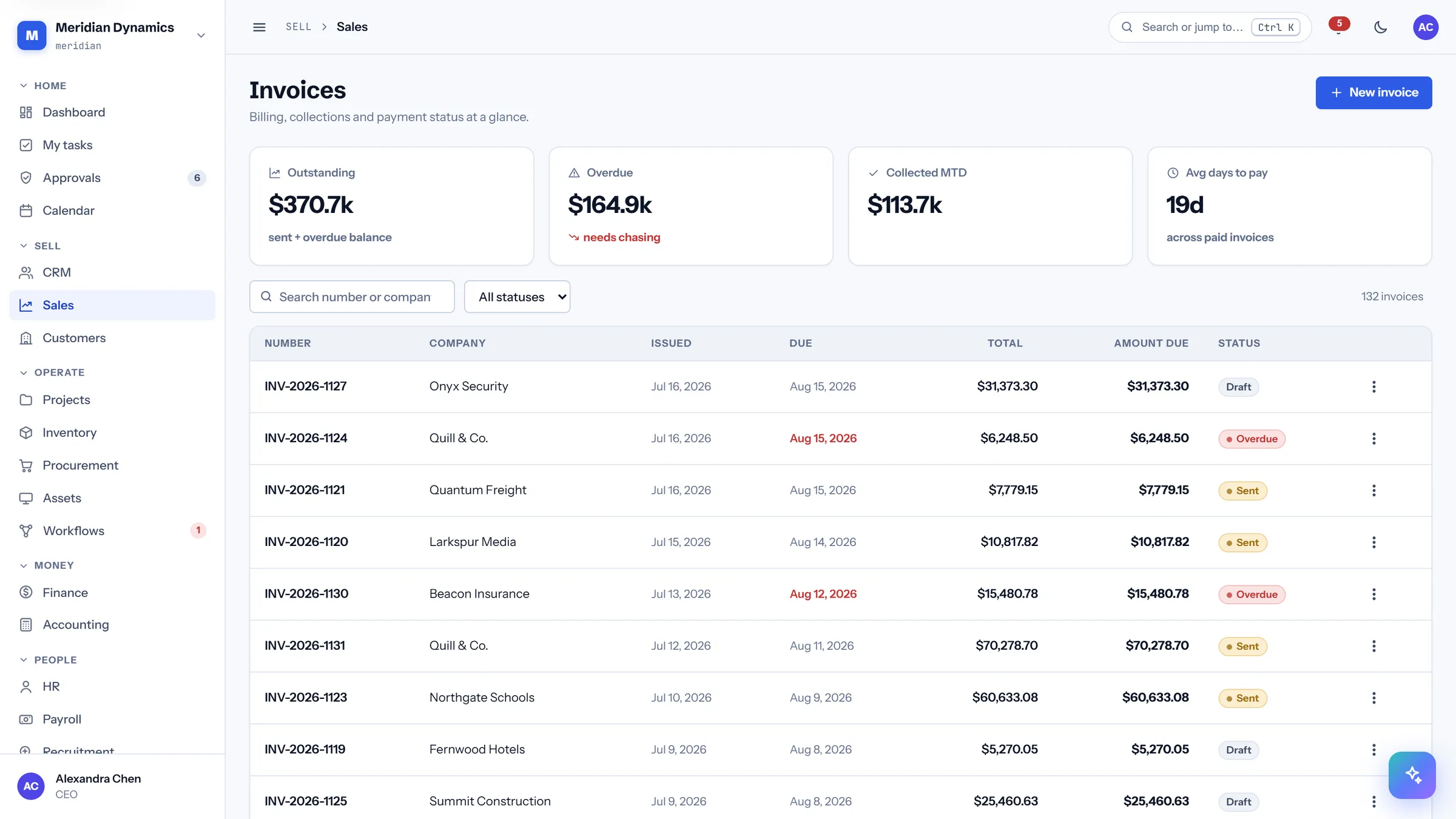
/app/sales
Invoices
/app/sales
The receivables ledger: what is outstanding, what is overdue, what came in this month, and how long customers actually take to pay.
Outstanding, overdue, collected-MTD, and average days-to-pay
Amount due tracked separately from invoice total, so part-payments are visible
Status per invoice — draft, sent, paid, overdue
Overdue balance called out for chasing
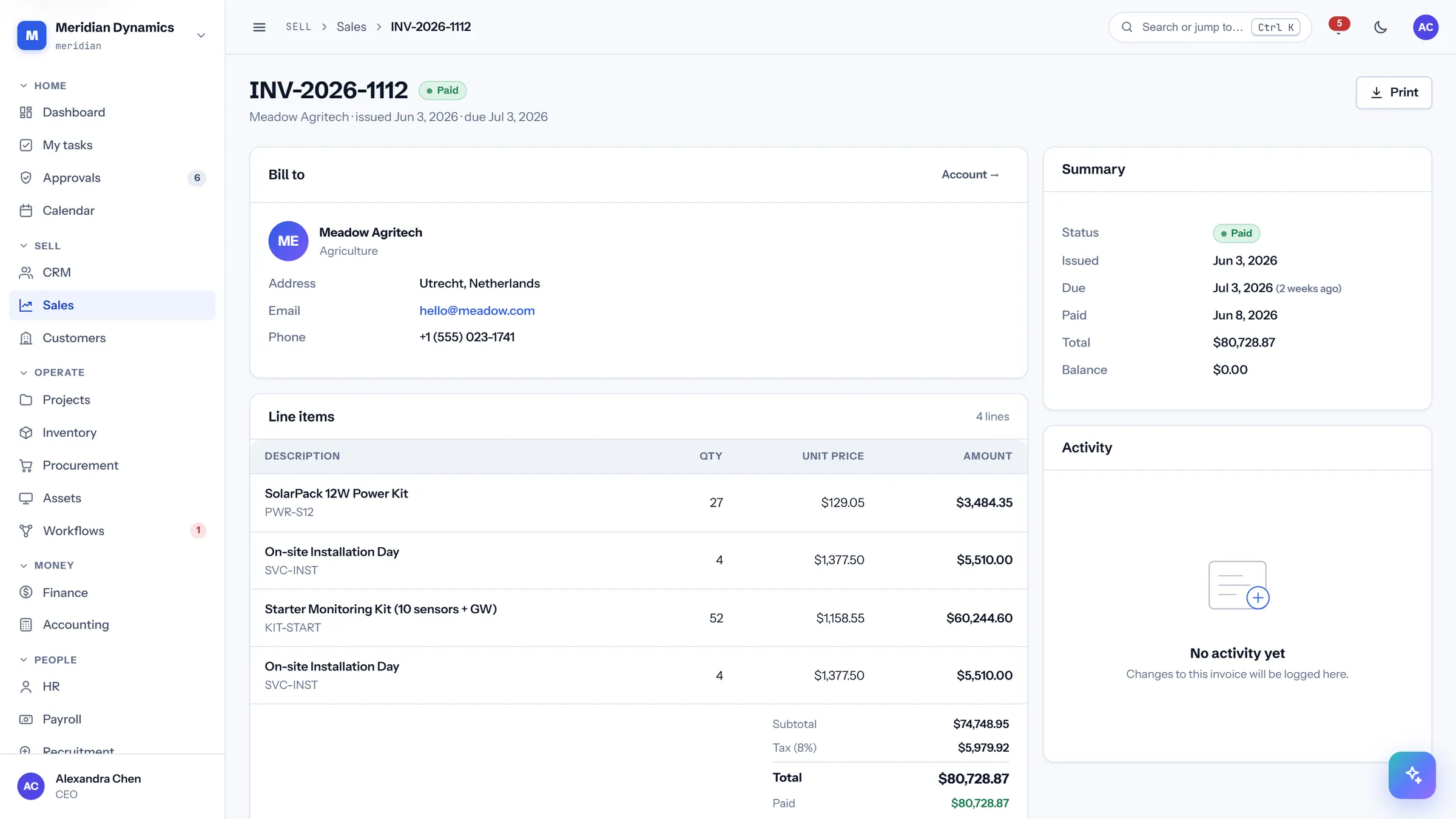
/app/sales/invoices/{id}
Invoice detail
/app/sales/invoices/{id}
One invoice in full: who it bills, the line items, every payment received against it, and the running summary.
Line items with quantity, unit price, and amount
Payments listed with date, method, and reference
Summary reconciles total, paid, and amount due
Activity trail showing issue, send, and payment events
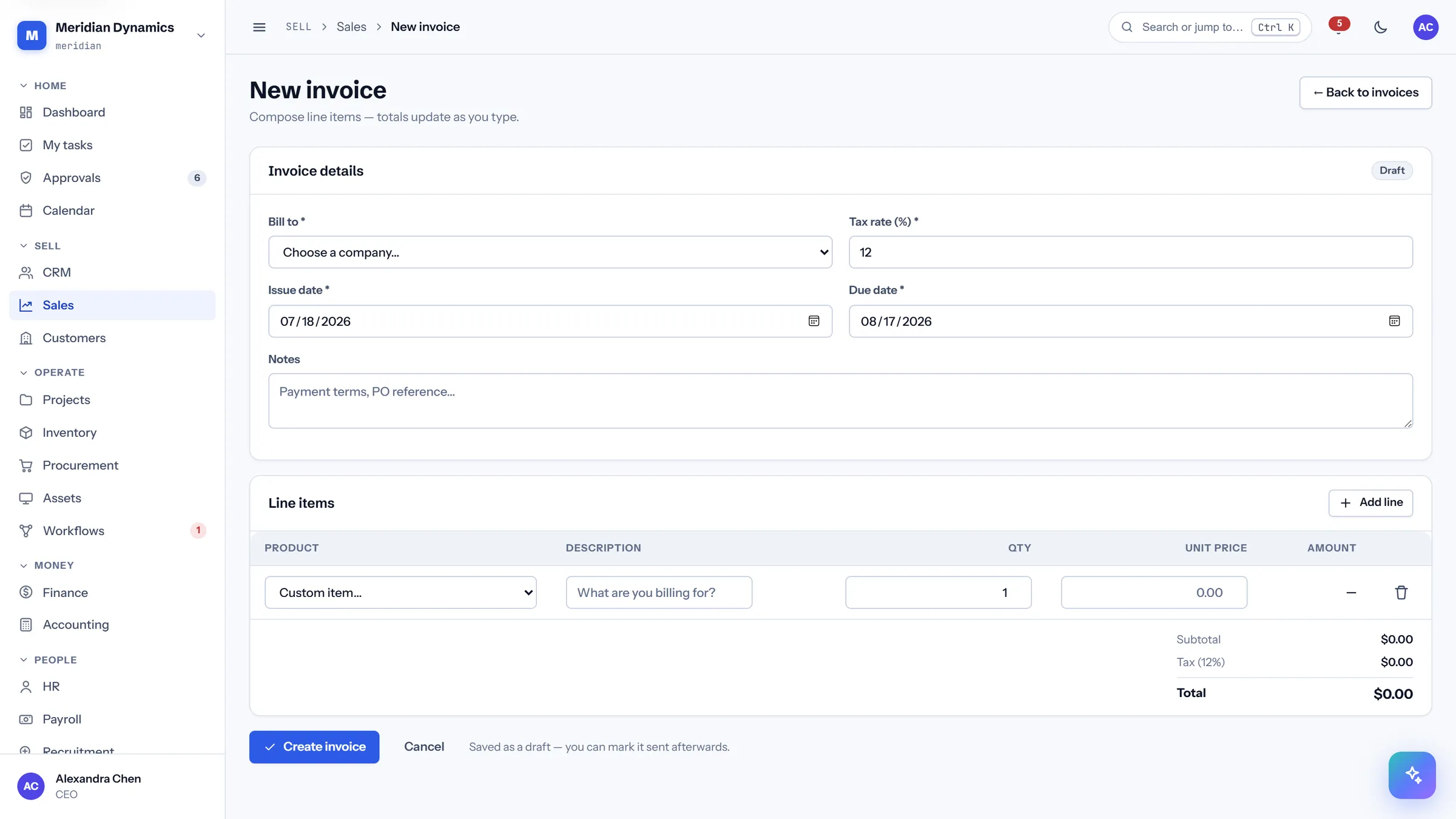
/app/sales/invoices/create
New invoice
/app/sales/invoices/create
Build an invoice from the product catalog with live line maths, rather than typing figures into a document.
Pick products from the catalog to prefill description and price
Line amounts and the invoice total recalculate as you type
Customer, issue date, and due date on the same form
Saves as a draft so it can be reviewed before sending
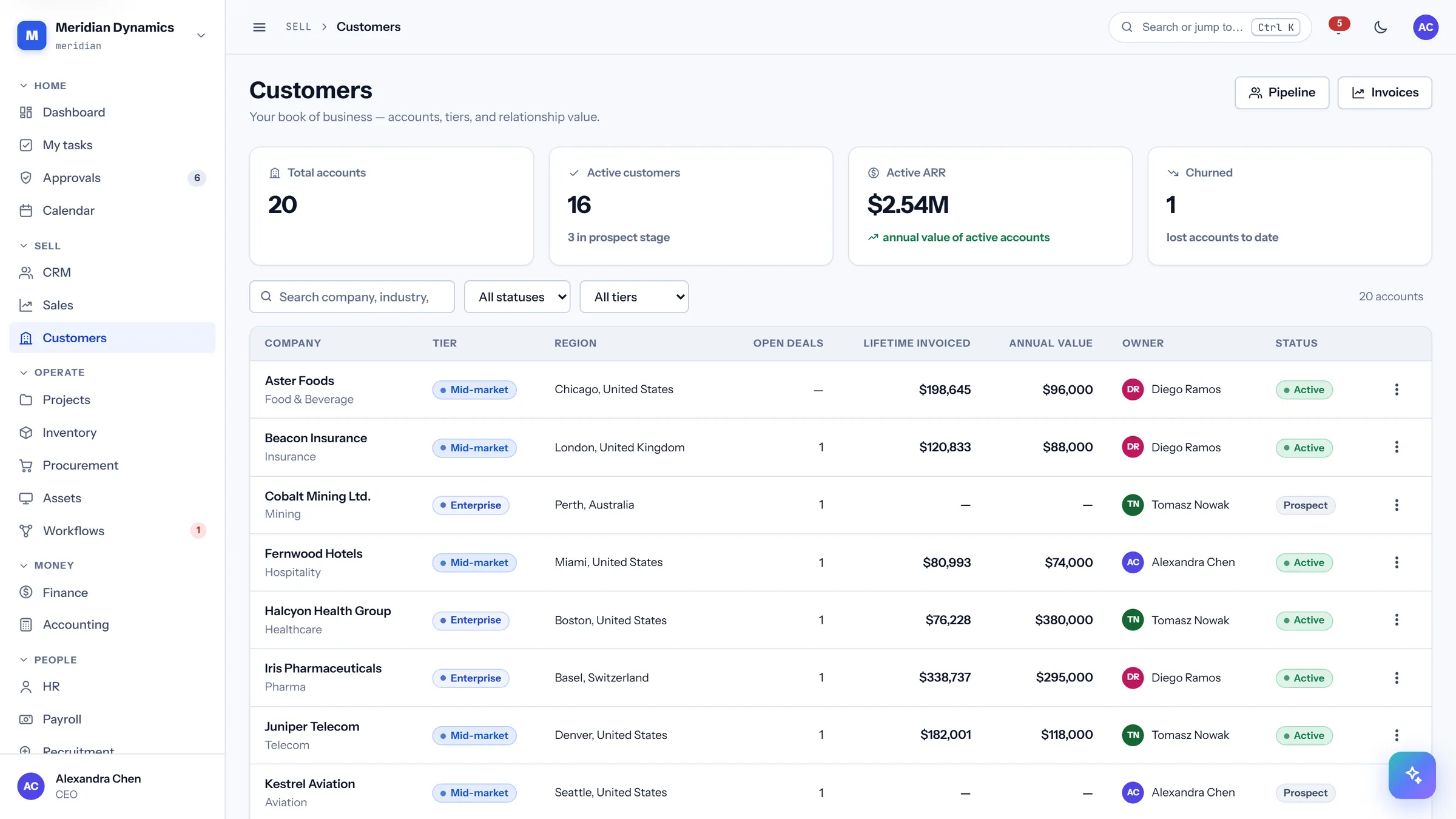
/app/customers
Customers
/app/customers
The account list with tier, region, open deals, lifetime invoiced, and contracted annual value — the commercial picture in one table.
Active ARR across the book, and churned accounts counted honestly
Open deal count per account
Lifetime invoiced beside contracted annual value
Owner and status on every account
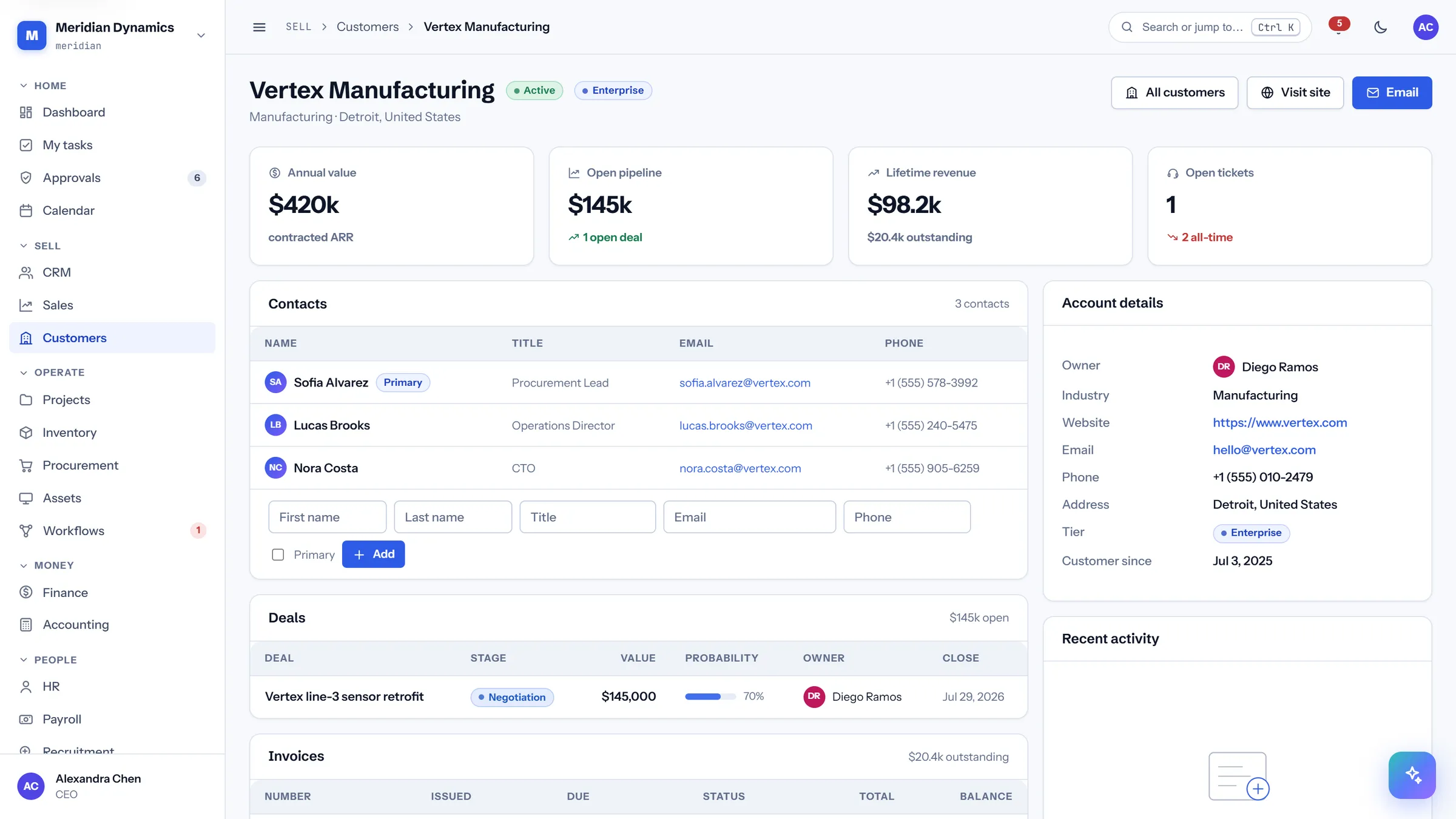
/app/customers/{id}
Customer record
/app/customers/{id}
Everything about one account on a single page: contacts, deals, invoices, and support tickets, so nobody has to ask three teams for the picture.
Annual value, open pipeline, lifetime revenue, and open tickets as headline figures
Contacts with title, email, and phone
Deals with stage, value, probability, and close date
Invoices and support history for the same account, side by side
03 · Operate
Operate
The delivery side: projects and their budgets, stock that warns you before it runs out, purchasing, the asset register, and the automation engine that removes the manual steps between them.
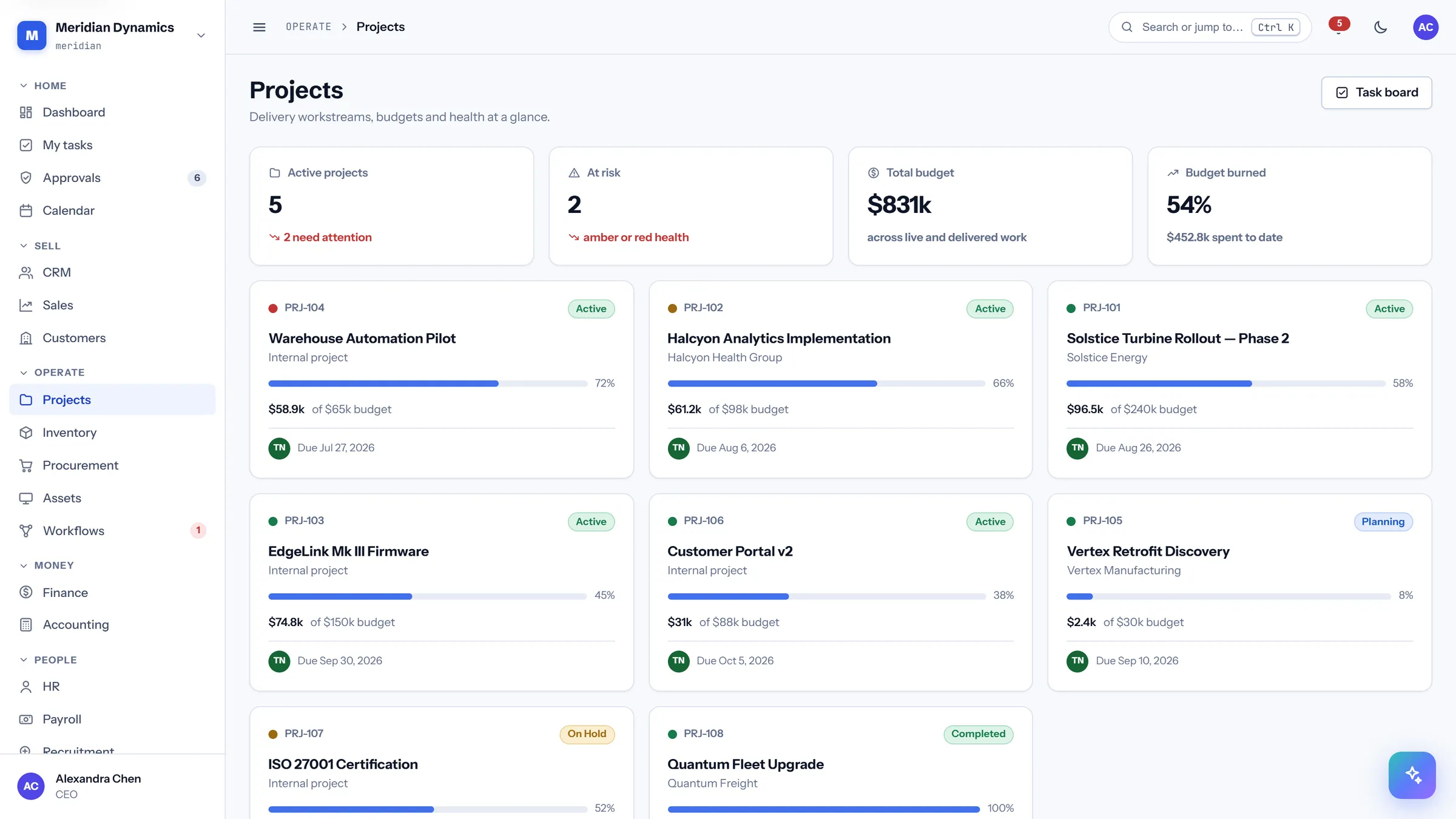
/app/projects
Projects
/app/projects
Live work with budget and health tracked together, so an at-risk project is visible before the invoice is.
Active projects with a count of those needing attention
At-risk projects flagged by amber or red health
Total budget and percentage burned across the portfolio
Health is stated with the threshold that produced it
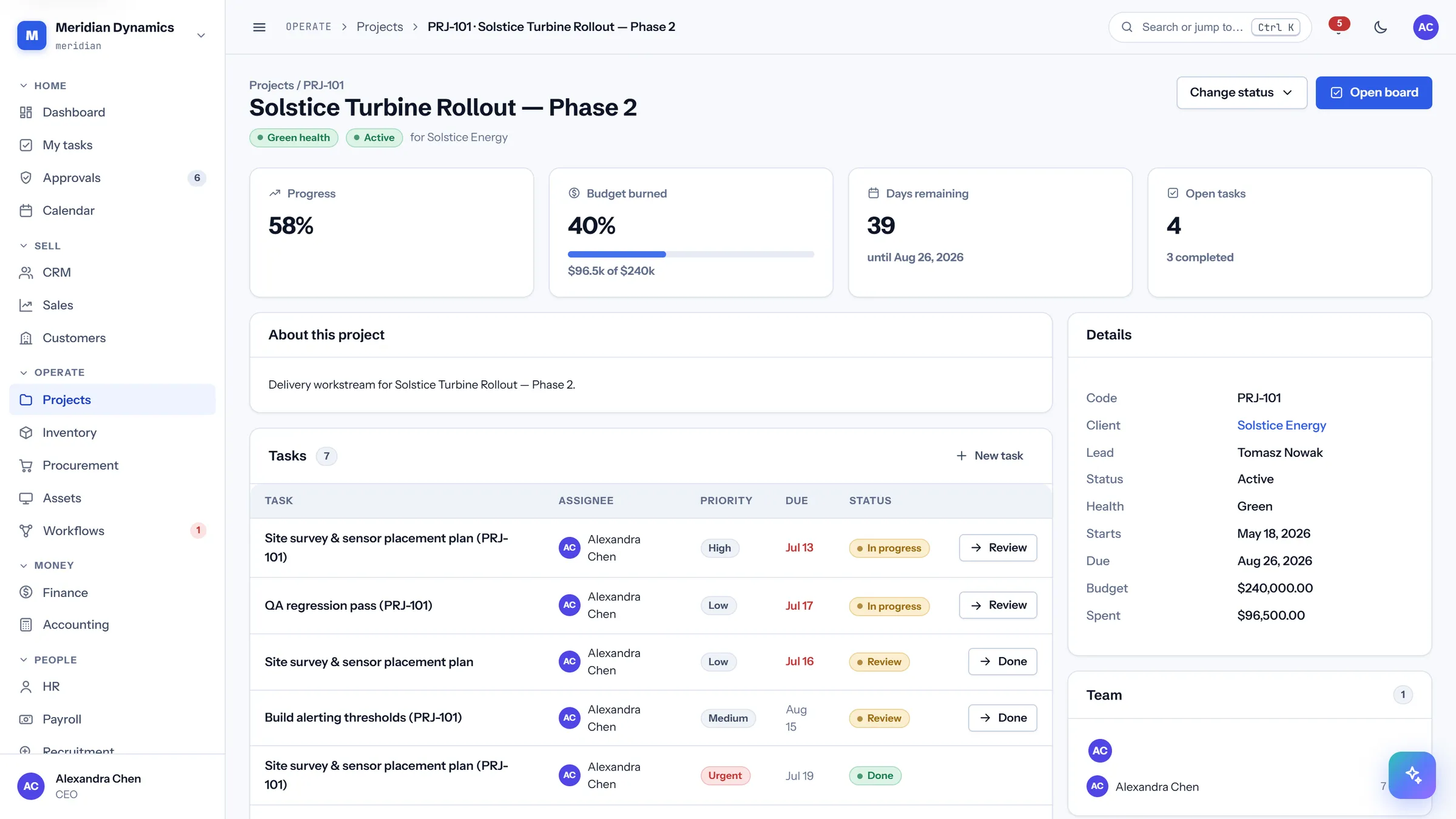
/app/projects/{id}
Project detail
/app/projects/{id}
One project: progress against budget, days remaining, the task list, delivery milestones, and the team on it.
Progress, budget burned, days remaining, and open tasks as headline figures
Task table with assignee, priority, due date, and status
Delivery milestones tracked separately from tasks
Team roster with roles
/app/inventory
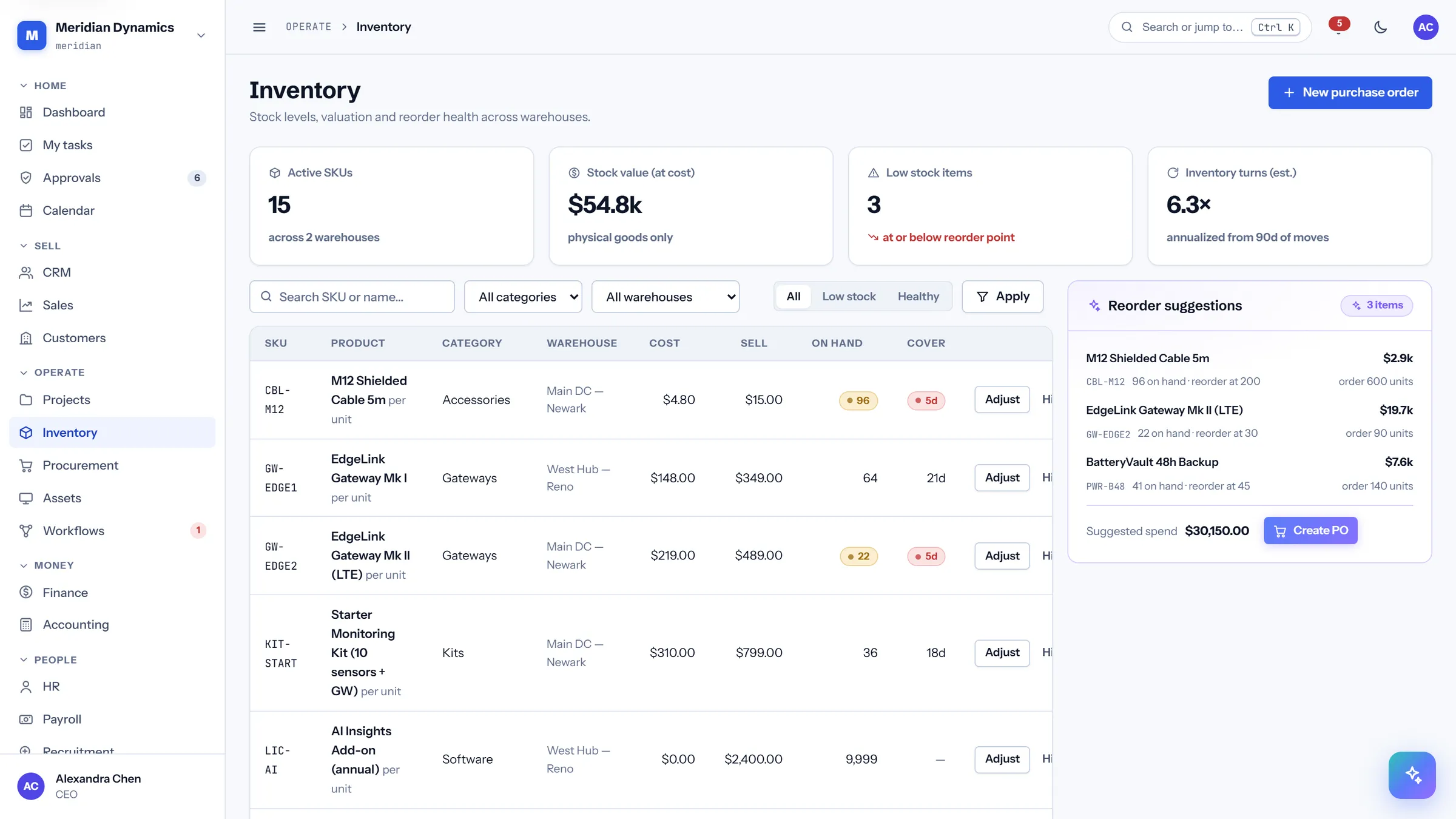
Inventory
/app/inventory
Stock across warehouses with days-of-cover per SKU, so reordering is driven by run-out date rather than by a monthly stock count.
Active SKUs, stock value at cost, low-stock count, and estimated turns
Cover in days per product, computed from actual movement
Reorder suggestions surfaced above the table
Cost and sell price side by side per SKU
/app/inventory/{id}
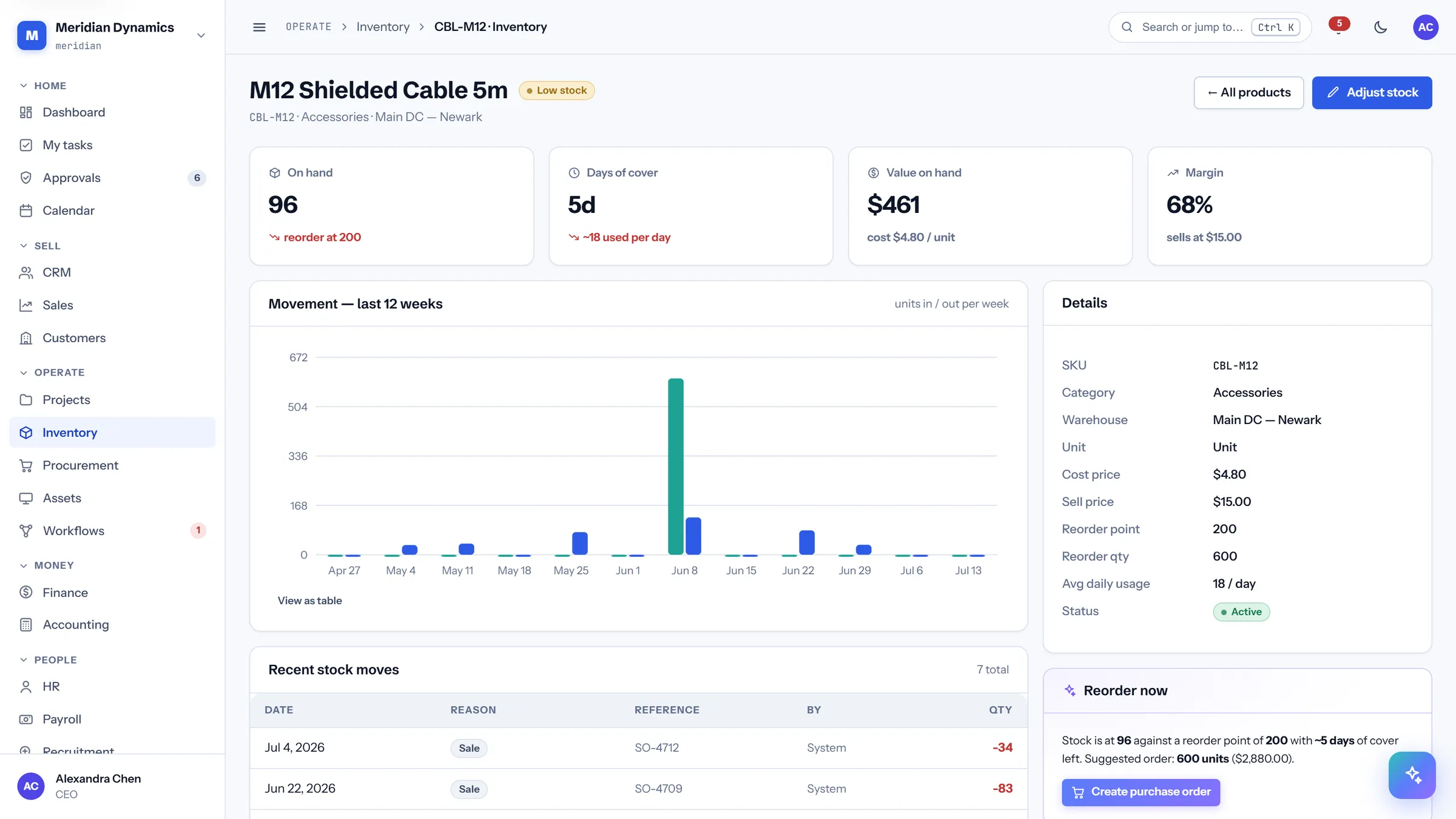
Product & stock history
/app/inventory/{id}
One SKU: what is on hand, how fast it moves, when it runs out, what it is worth, and every movement that got it there.
On hand against reorder point, with days of cover and daily usage
Value on hand and margin at the current sell price
Twelve-week movement chart
Stock move ledger with reason, reference, and who moved it
/app/procurement
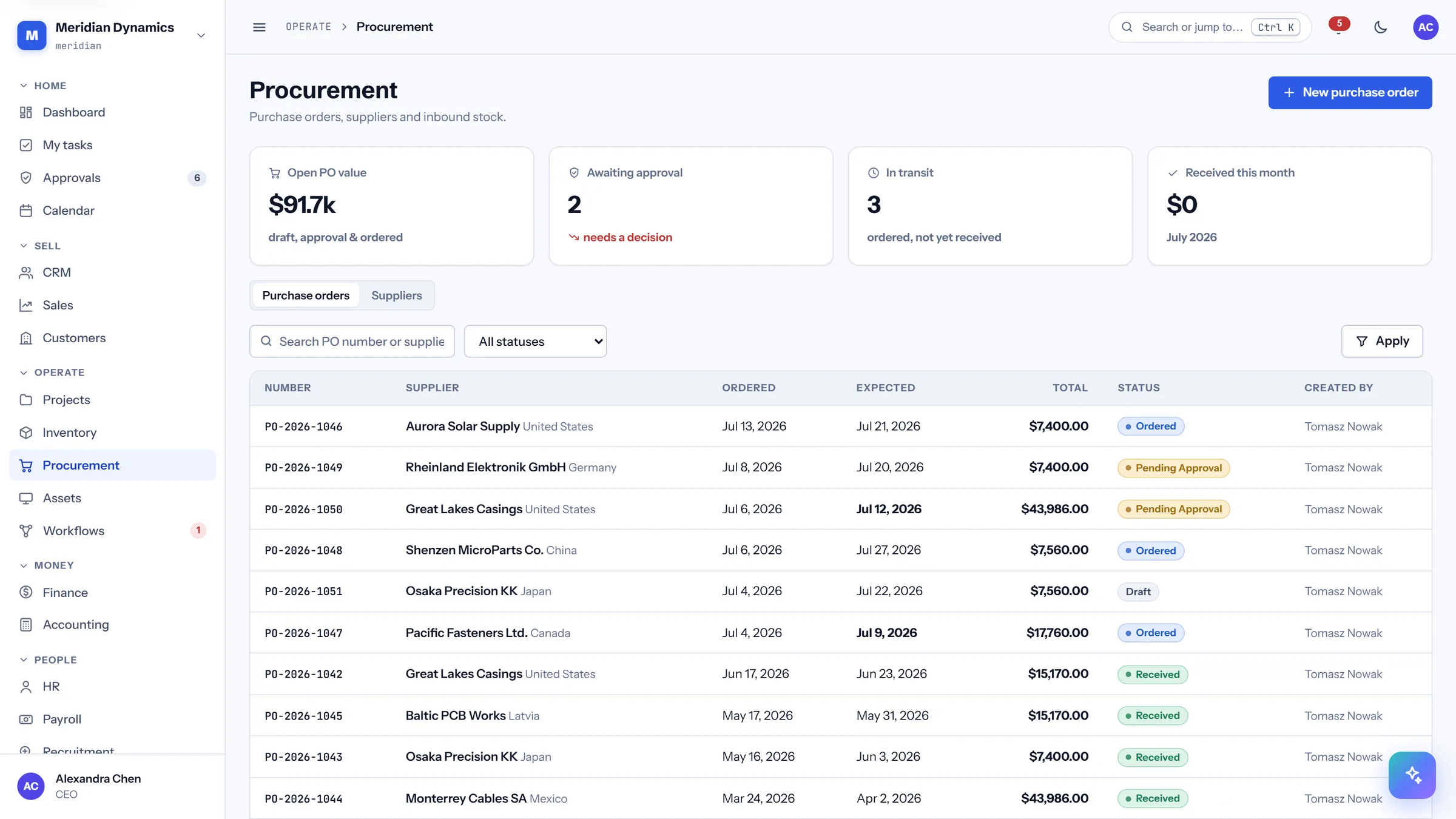
Procurement
/app/procurement
Purchase orders from draft through approval to received, with the money committed at each stage made explicit.
Open PO value split across draft, approval, and ordered
Awaiting-approval and in-transit counts
Received-this-month total
Full PO table with supplier, dates, total, and status
/app/procurement/orders/{id}
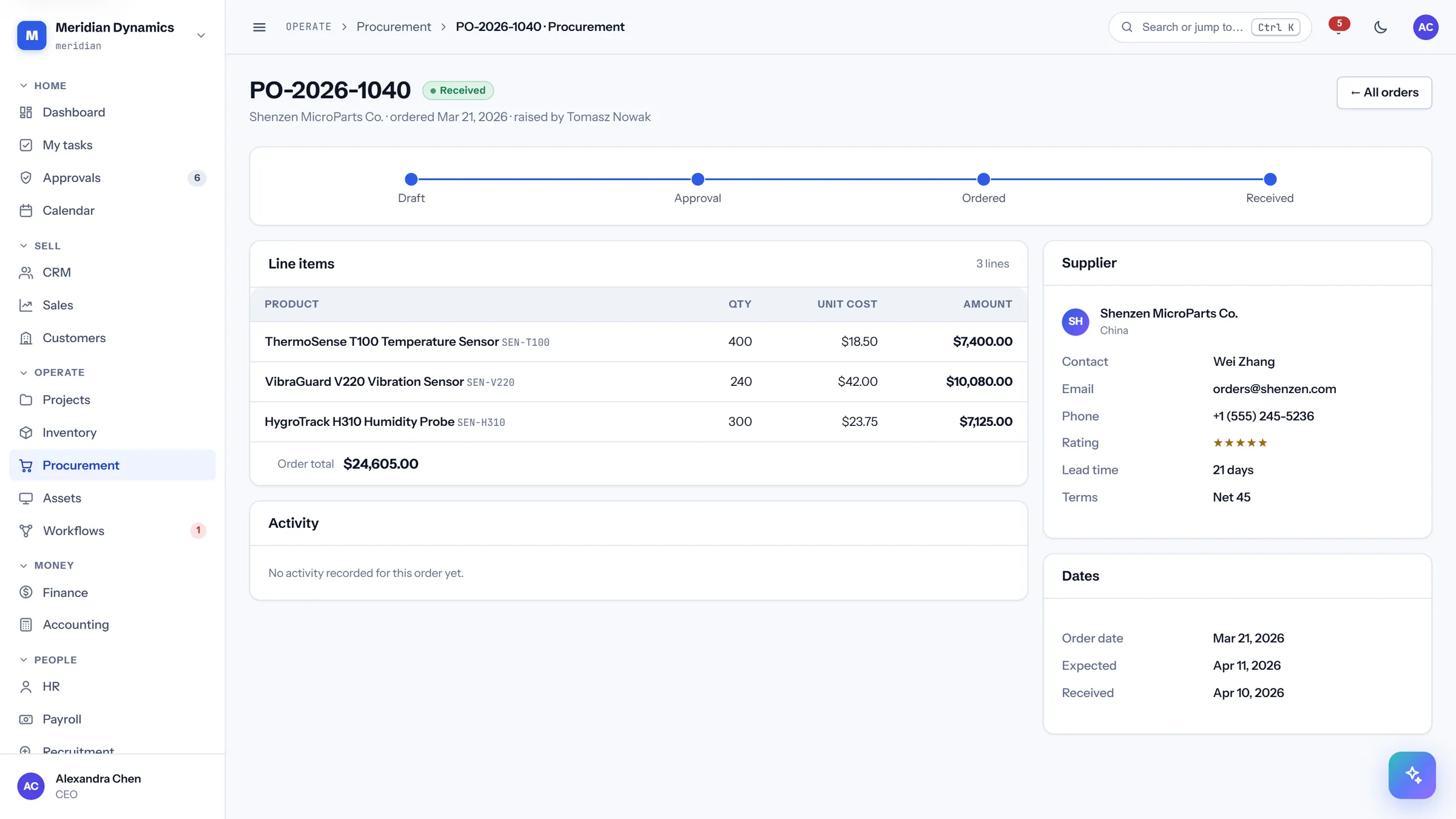
Purchase order
/app/procurement/orders/{id}
One order: the lines, the supplier, the dates promised and met, and the approval trail.
Line items with quantity, unit cost, and amount
Supplier panel with terms and lead time
Ordered and expected dates tracked separately
Activity trail across the approval and receipt steps
/app/procurement/suppliers
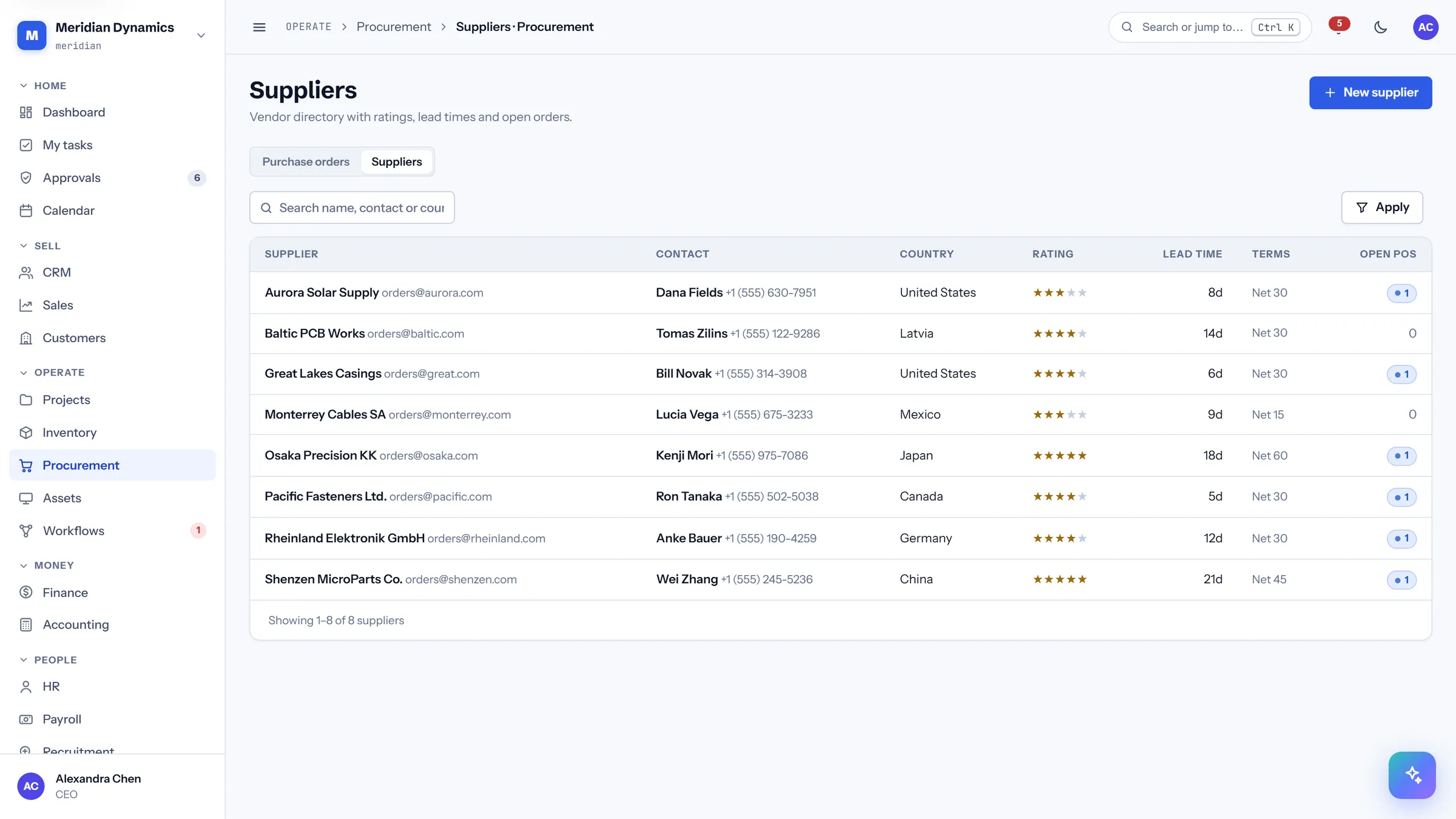
Suppliers
/app/procurement/suppliers
The supplier book with rating, lead time, and payment terms — the facts you need when deciding who to order from.
Rating and lead time per supplier
Payment terms held against the record
Open PO count per supplier
Contact and country for each
/app/assets
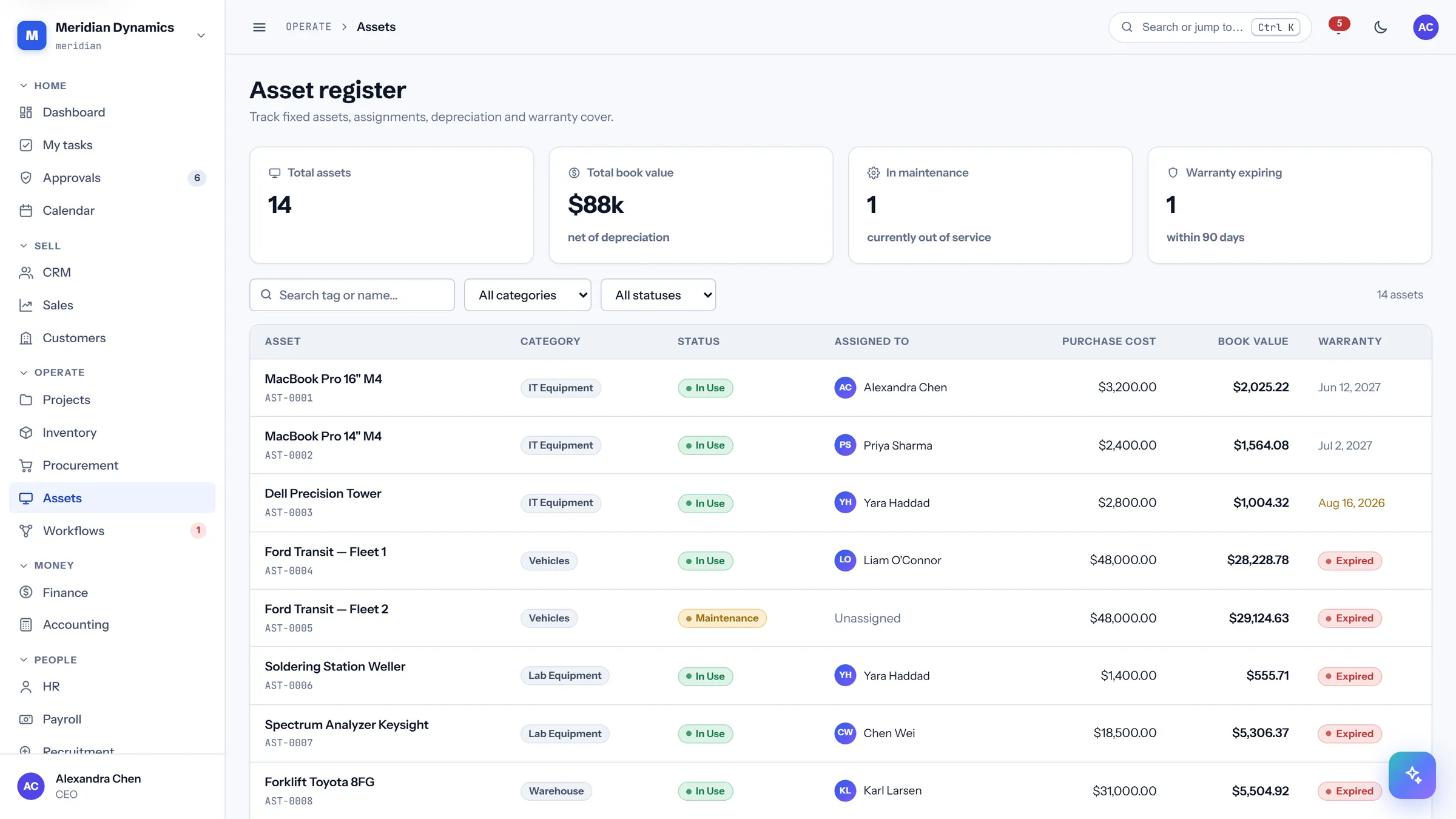
Asset register
/app/assets
Company equipment with book value net of depreciation, who holds it, and what is about to fall out of warranty.
Total assets and book value net of depreciation
In-maintenance count for equipment out of service
Warranty-expiring-within-90-days warning
Assignment to a named employee
/app/assets/{id}
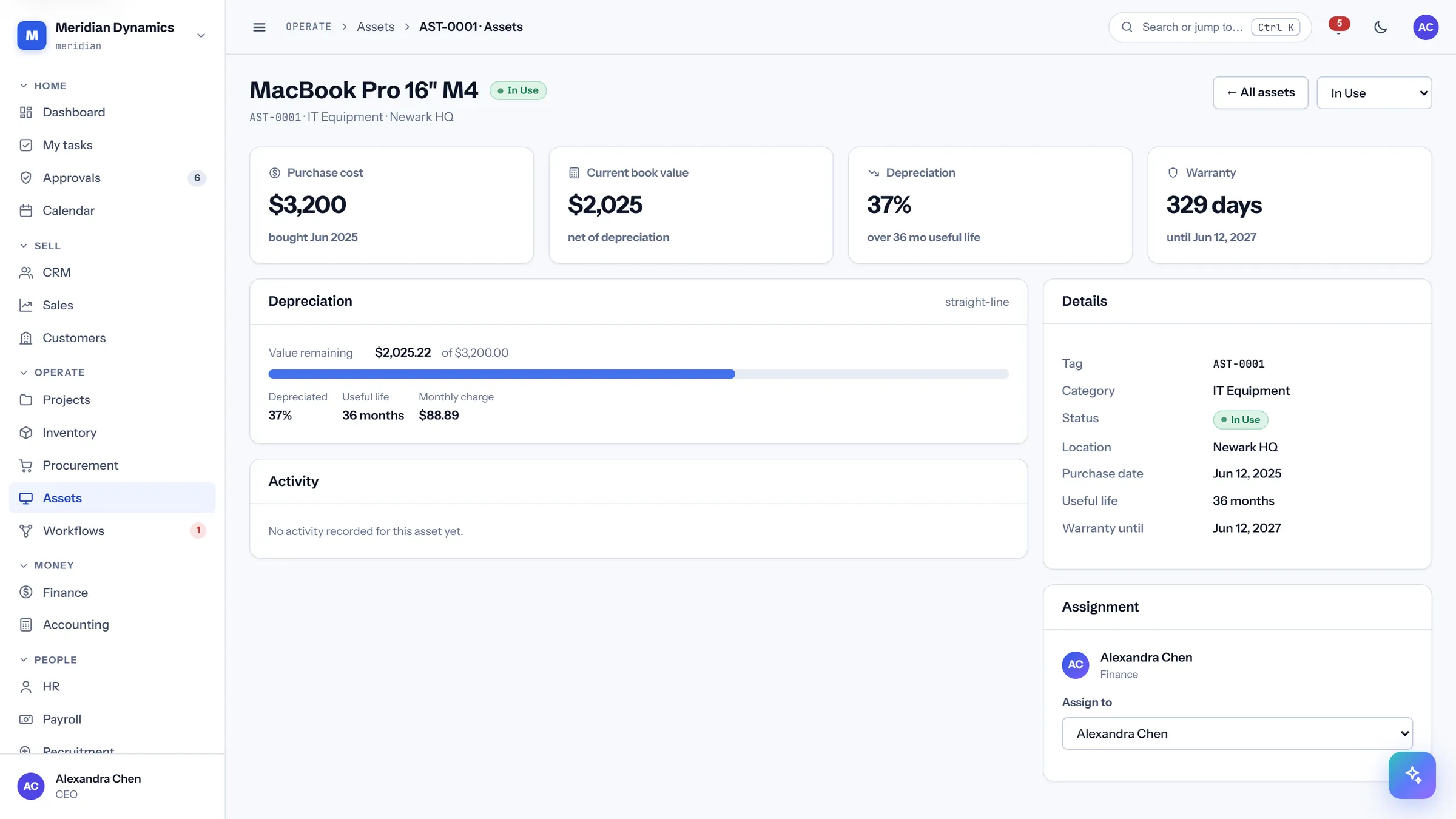
Asset detail
/app/assets/{id}
One asset: purchase cost, current book value, the depreciation curve, warranty runway, and its assignment history.
Purchase cost against current book value
Depreciation percentage over the useful life
Days of warranty remaining with the end date
Assignment and maintenance activity trail
/app/workflows
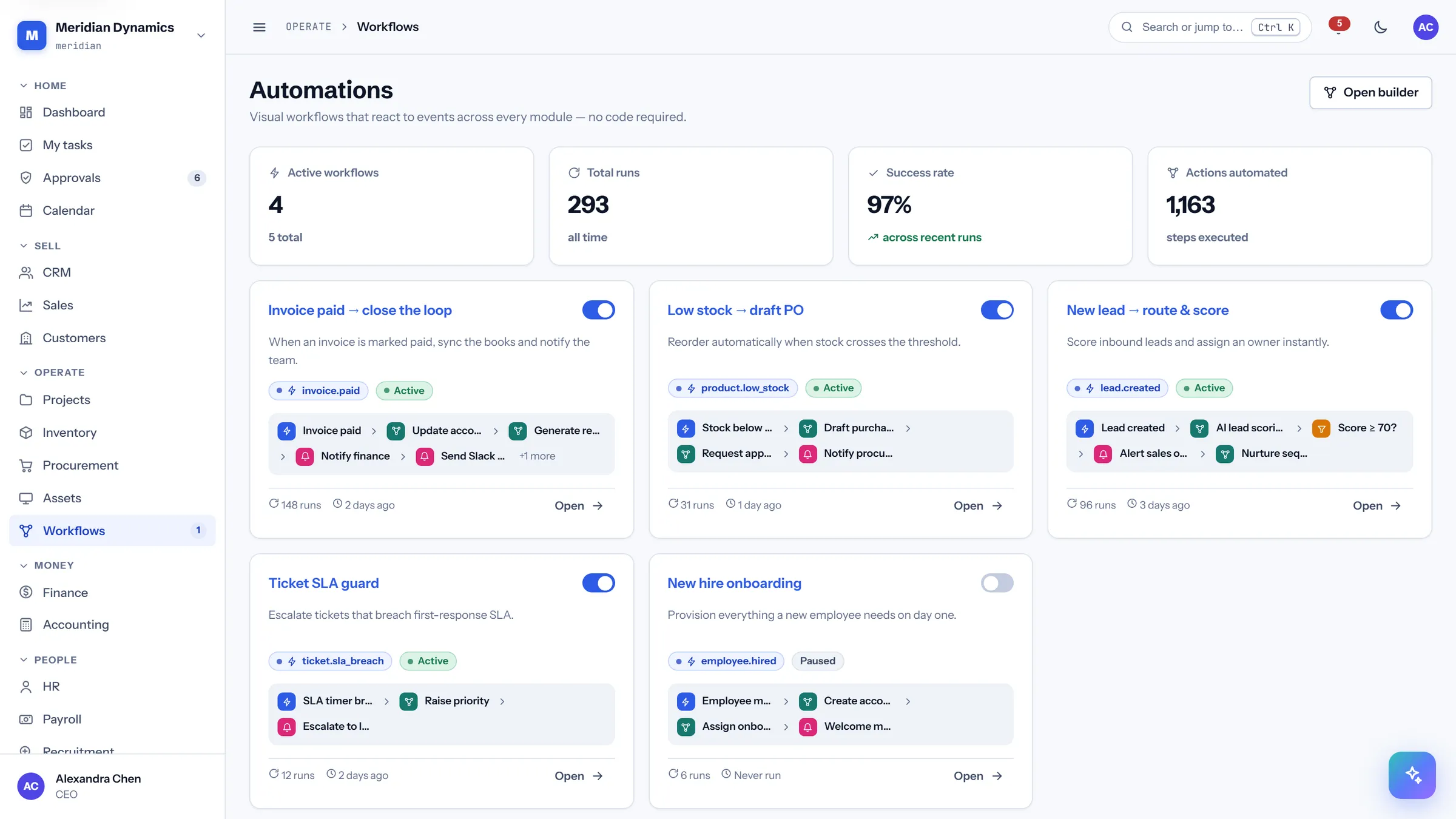
Automations
/app/workflows
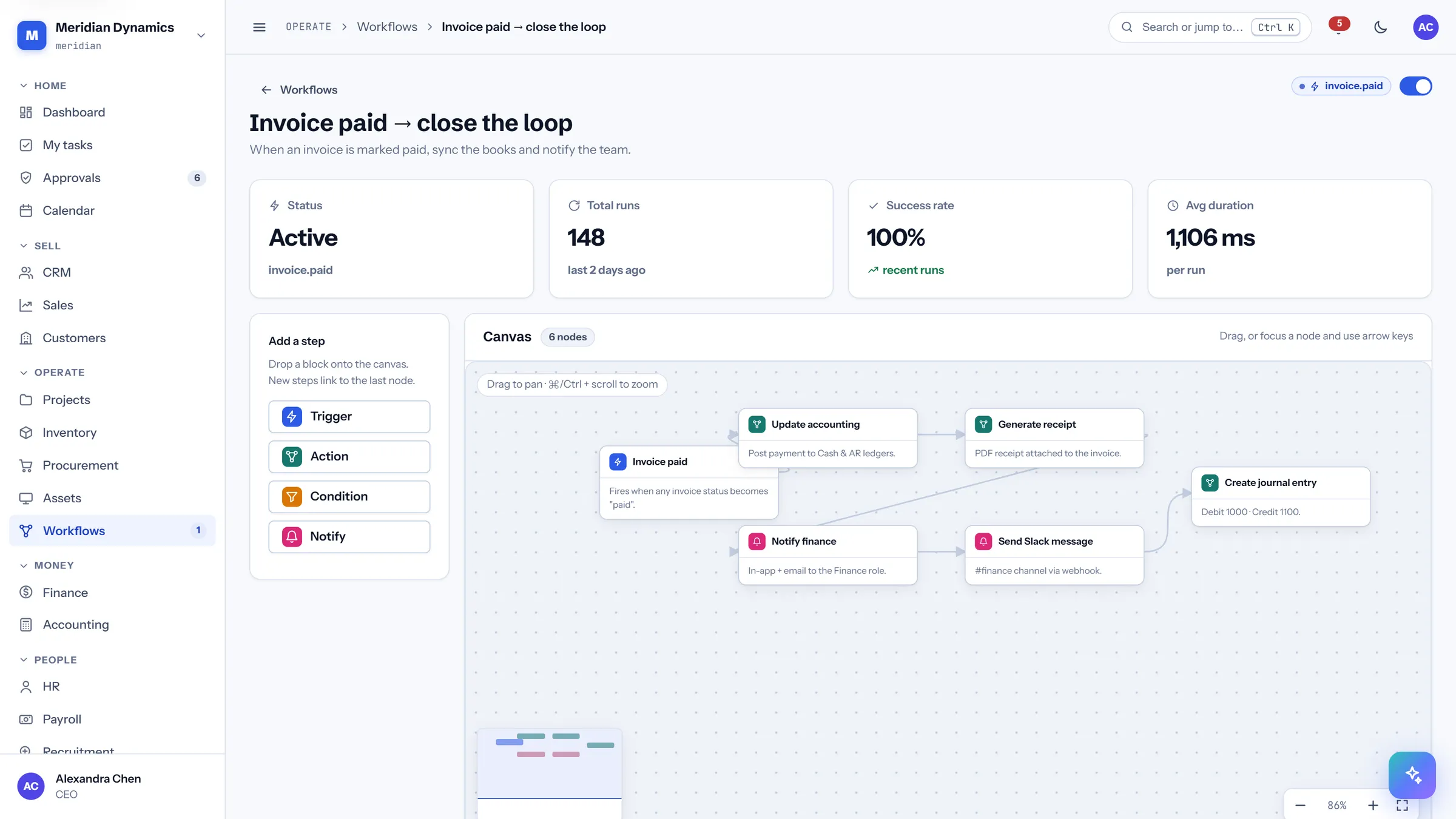
The automation library: what is running, how often it runs, and whether it is succeeding — with failures surfaced rather than buried.
Active workflow count against total
Total runs and success rate across recent runs
Count of actions automated, so the saving is quantified
Failed runs raise a badge in the sidebar
/app/workflows/{id}
Workflow canvas
/app/workflows/{id}
The visual builder: a trigger, the steps it fires, and the connections between them — pannable, zoomable, and fully keyboard-editable.
Pan by dragging; zoom with ⌘/Ctrl + wheel, anchored at the cursor
Live minimap with a viewport box and click-to-centre
Nodes snap to an 8px grid; arrow keys move them, Shift for fine control
Run history with status, trigger, duration, and timestamp per run
04 · Money
Money
Cash position, budgets, the ledger, and the reporting that turns them into something you can hand to a board.
/app/finance
Finance cockpit
/app/finance
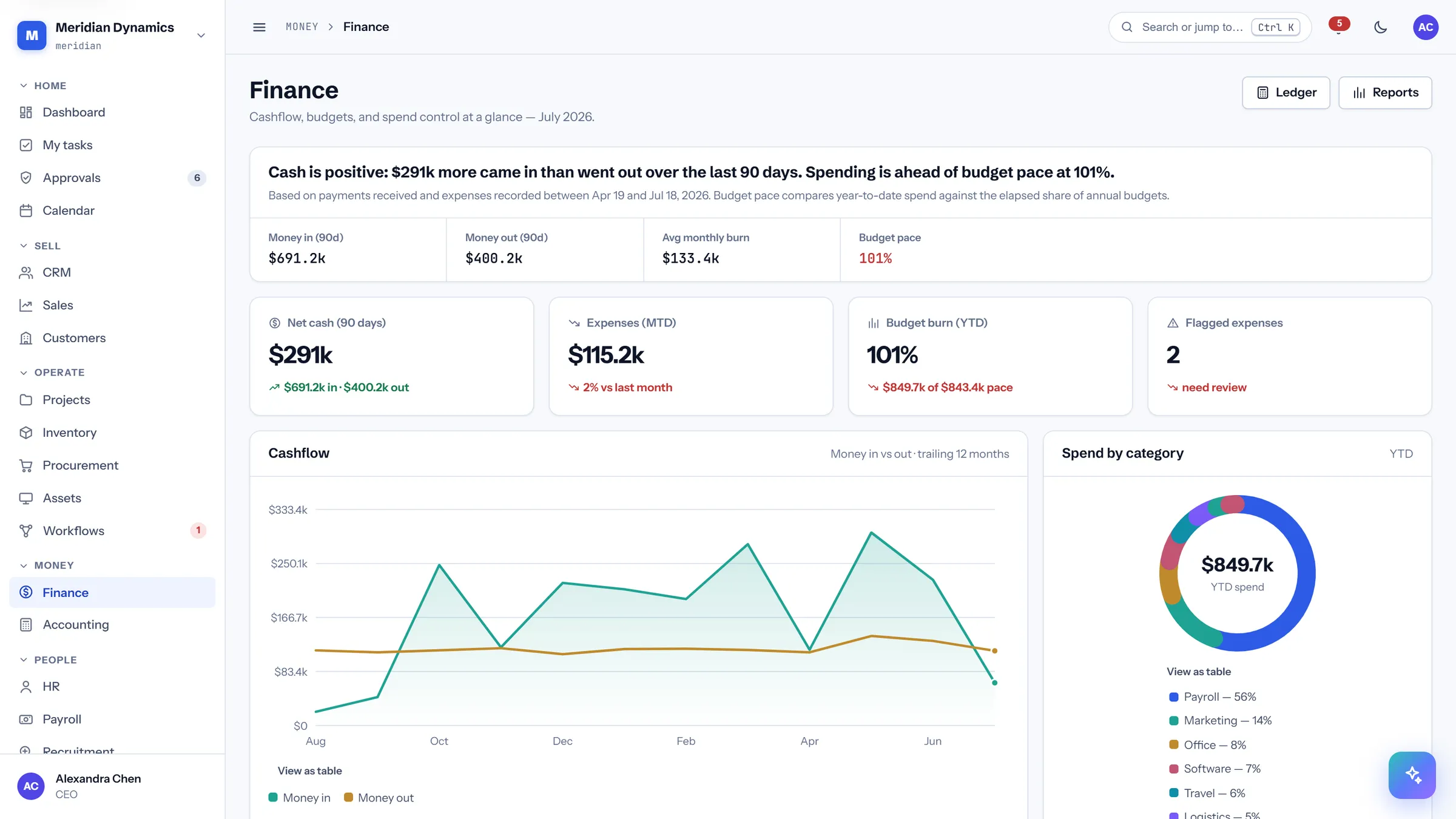
Opens with the answer in words — whether cash is positive, over what window, and how spending compares to budget pace — then shows the charts that support it.
Position stated in a sentence, with the basis and date window named
Net cash over 90 days, money in against money out
Budget burn year-to-date against elapsed pace, not against the annual total
Flagged expenses that need review, with the anomaly rule stated
/app/accounting
Accounting
/app/accounting
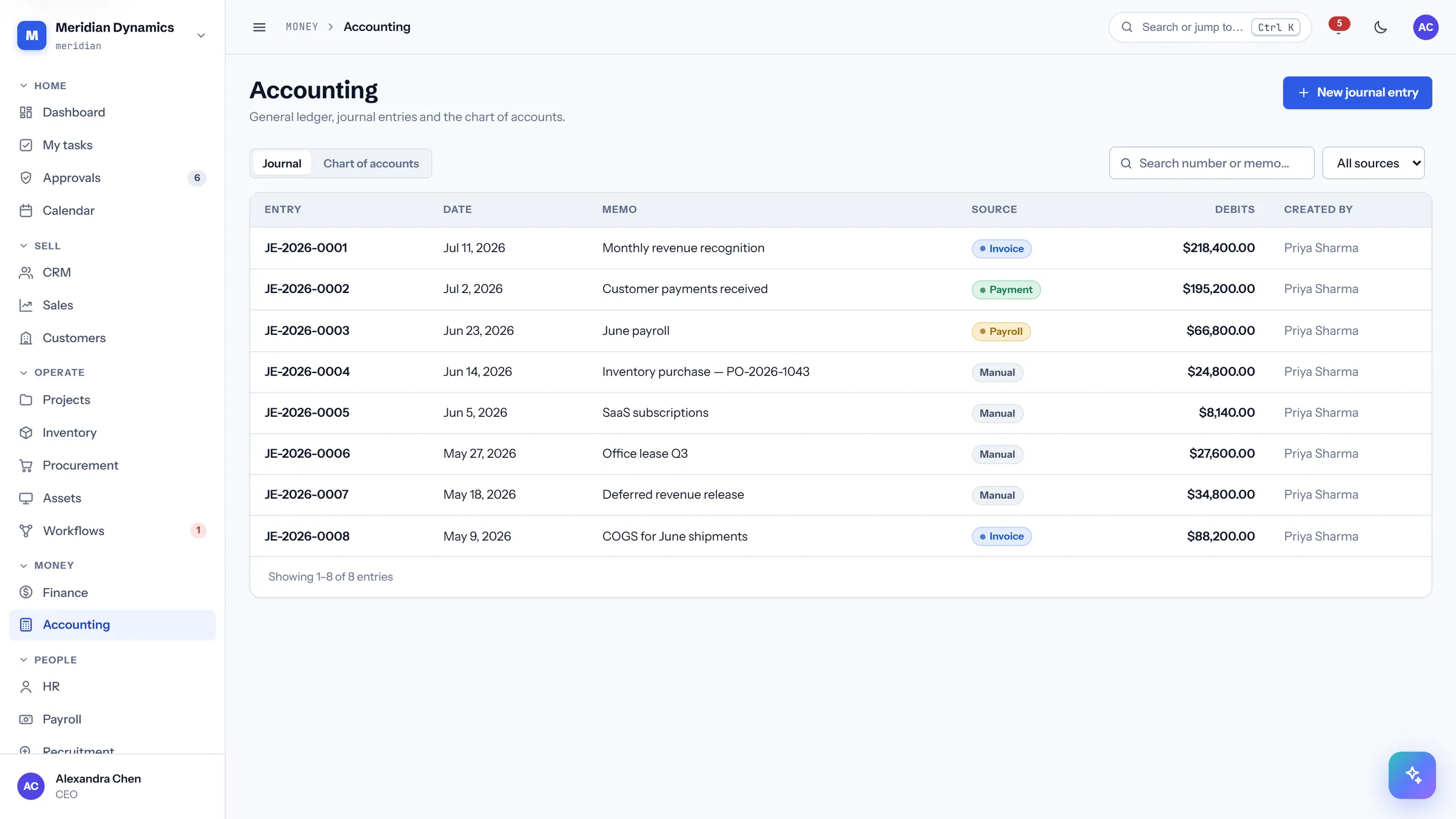
The journal: every entry with its source, memo, and debit total, posted or draft.
Entries listed with date, memo, source module, and debits
Source shows which module generated the entry
Draft and posted states distinguished
Created-by recorded on every entry
/app/accounting/journal/{id}
Journal entry
/app/accounting/journal/{id}
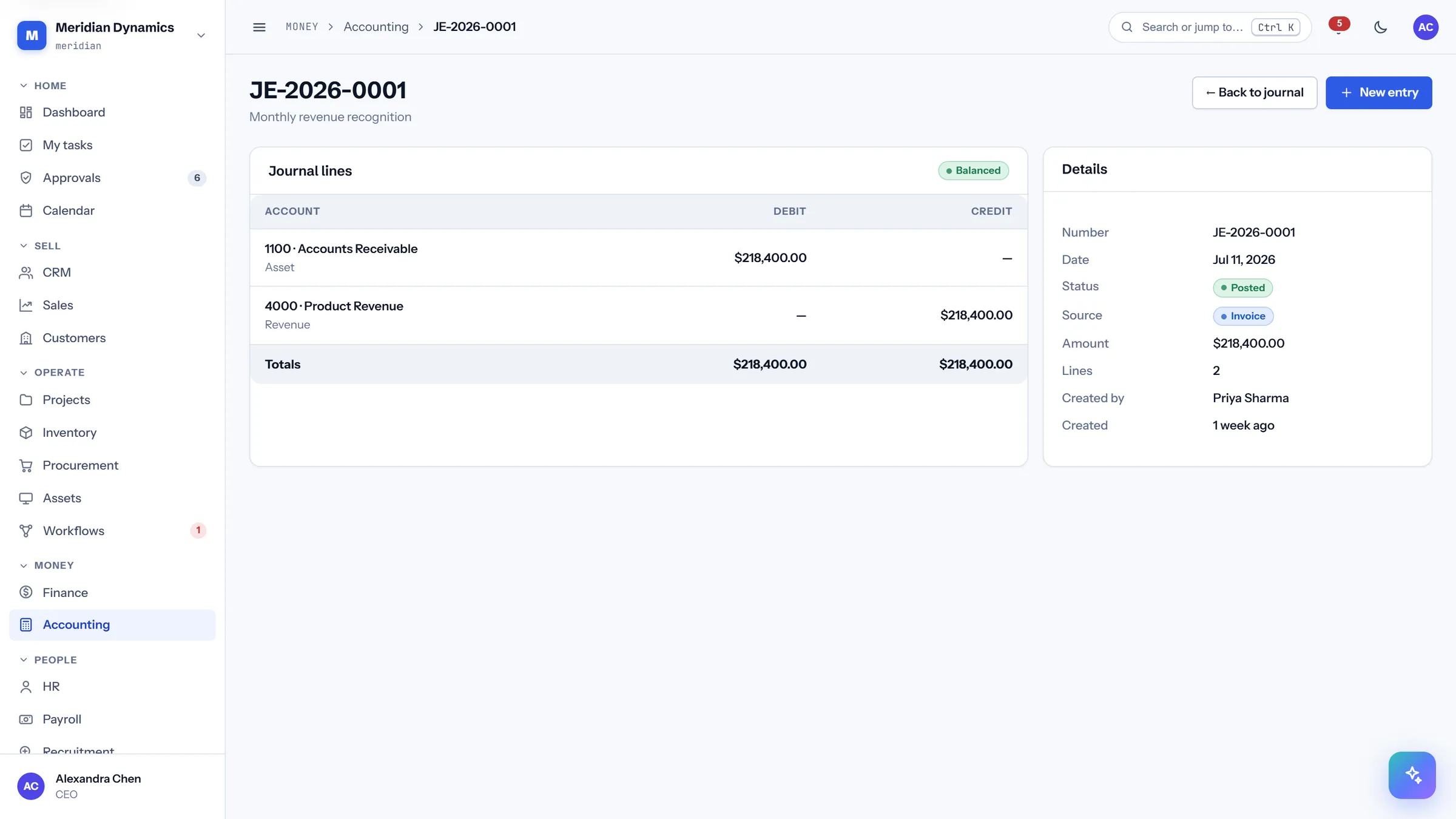
One entry with its lines, each account debited or credited, and the balance proven on screen.
Journal lines with account, debit, and credit
Entry balance shown explicitly
Source document linked where the entry was generated
Posted entries are corrected by new entries, never edited away
/app/reports
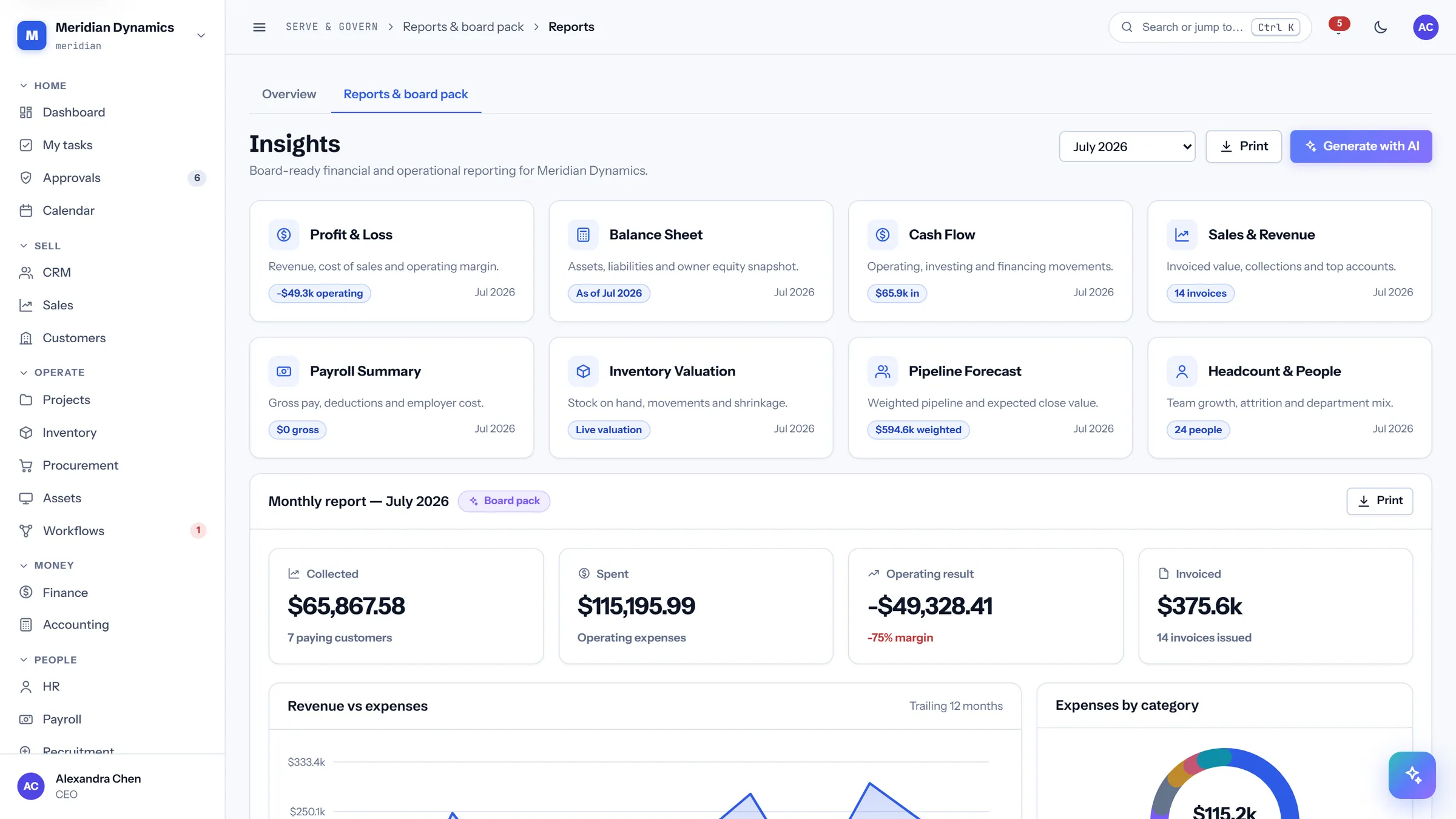
Reports & board pack
/app/reports
The monthly pack: collected, spent, operating result, headcount, payroll, and support — assembled as one printable document.
Monthly report with revenue, expenses, pipeline, and payroll sections
Revenue by customer and expenses by category
Print stylesheet repeats table headers per page and avoids breaking figures across pages
Chart data tables are forced visible in print, so the numbers survive black and white
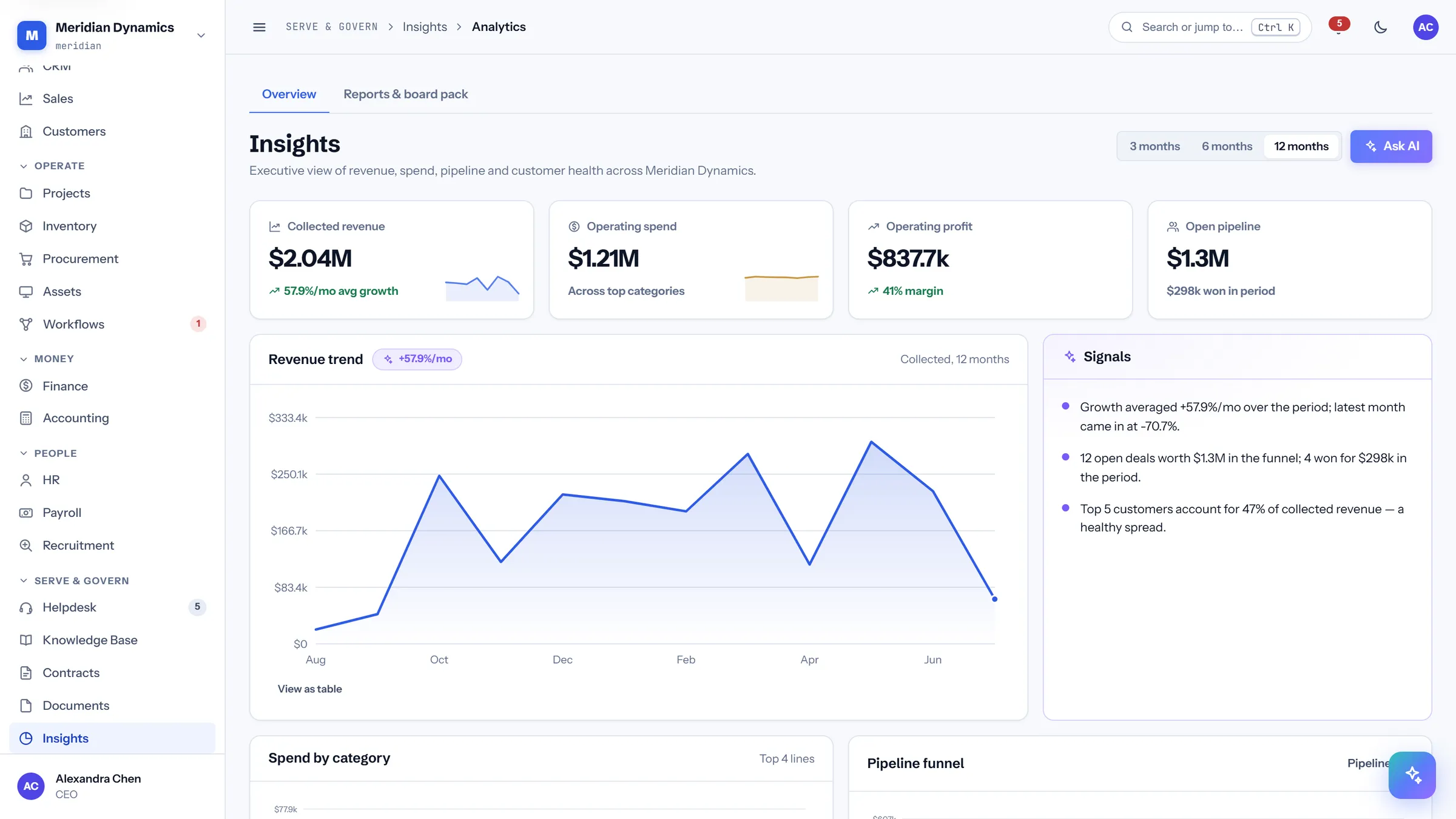
/app/analytics
Analytics
/app/analytics
The longer view: revenue trend, spend by category, pipeline funnel, customer concentration, and support sentiment across the full period.
Every chart carries a generated text summary for screen readers
Charts are keyboard-navigable, with a crosshair readout on the arrow keys
"View as table" on every chart, so the numbers are never trapped in pixels
Customer concentration surfaced as a risk signal
05 · People
People
Headcount, compensation, payroll runs, and the hiring pipeline that feeds them.
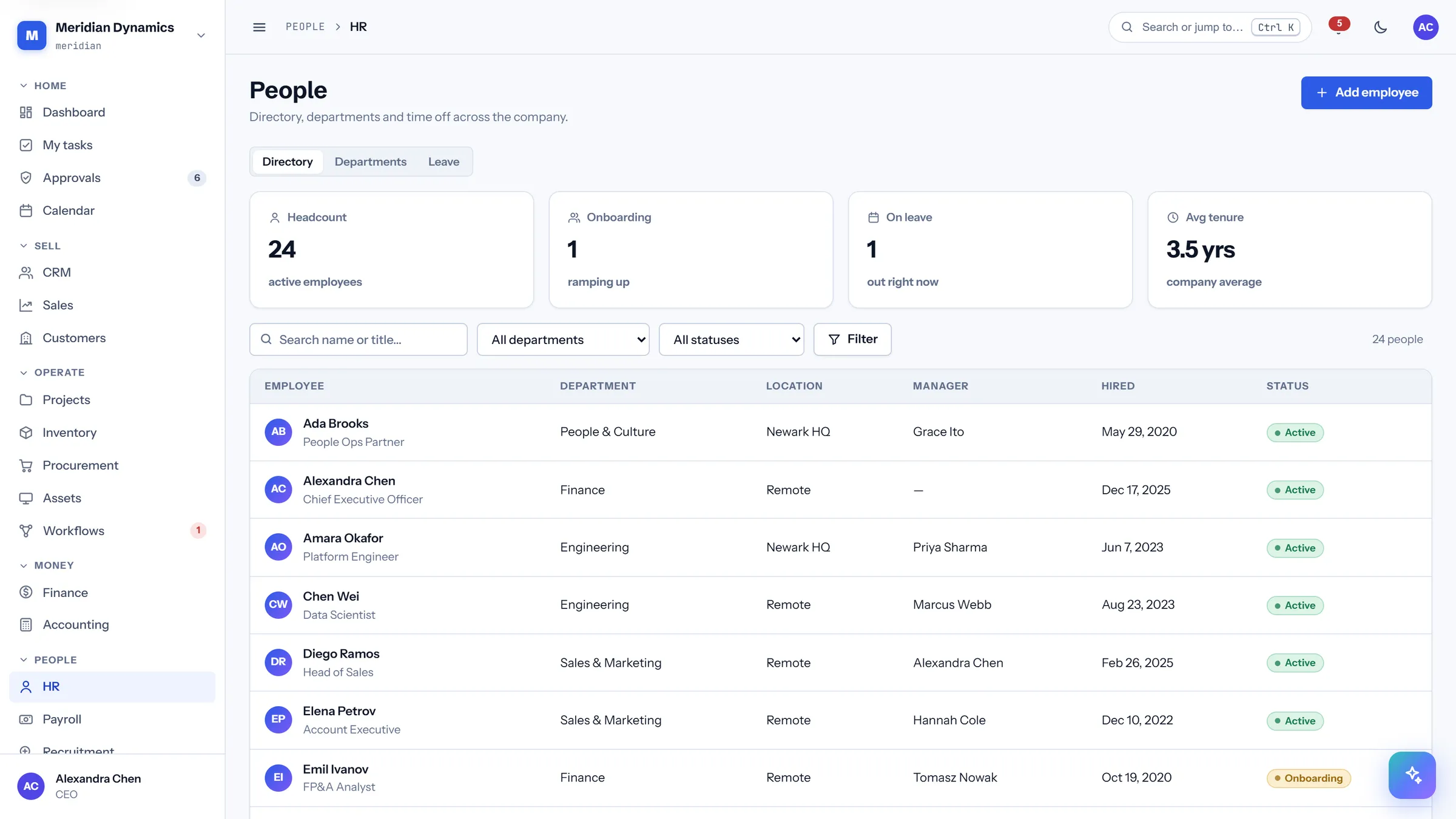
/app/hr
People directory
/app/hr
The employee register with department, location, manager, and tenure.
Headcount, onboarding, on-leave, and average tenure
Reporting line held against each employee
Location and department for distributed teams
Status distinguishes active, onboarding, and leavers
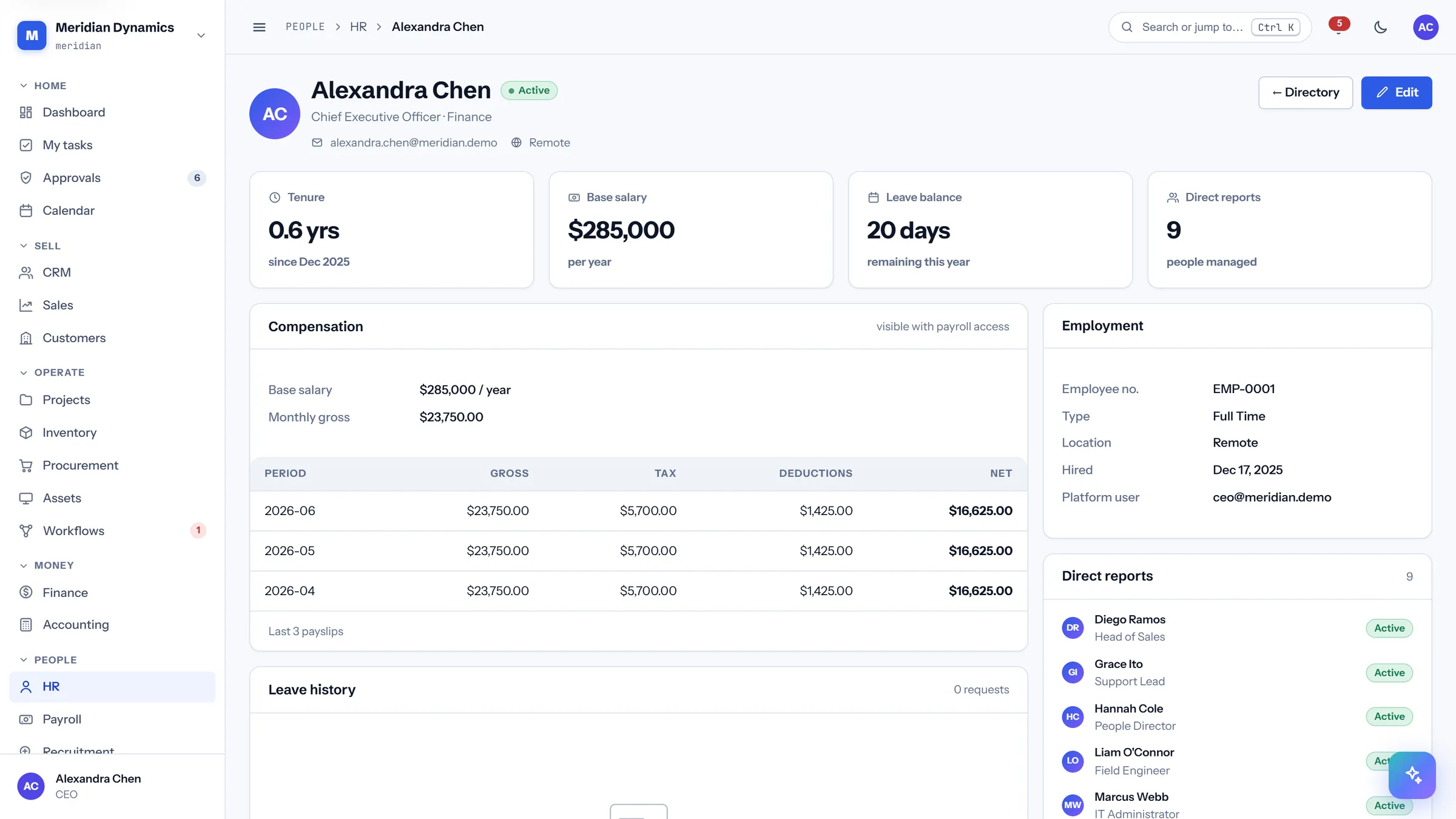
/app/hr/employees/{id}
Employee record
/app/hr/employees/{id}
One employee: compensation, leave balance, payslip history, performance reviews, and direct reports.
Tenure, base salary, leave balance, and direct-report count
Payslip history with gross, tax, deductions, and net
Leave history and performance reviews on the same record
Visible only to roles holding the HR permission
/app/payroll
Payroll
/app/payroll
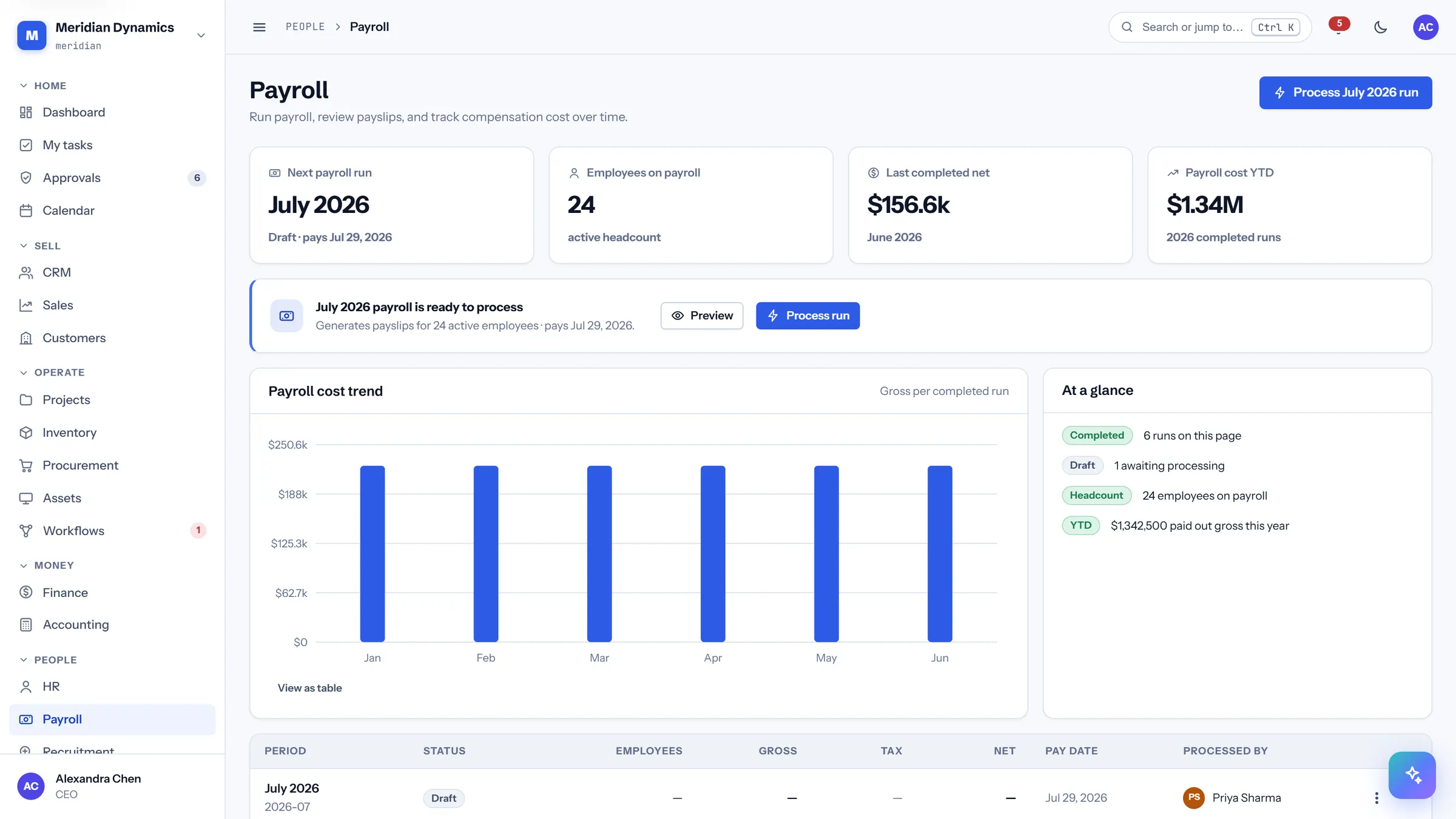
Every run, past and pending, with the next pay date and the year-to-date cost of employing the company.
Next run with its status and pay date
Last completed net, and payroll cost year-to-date
Run table with gross, tax, net, and who processed it
Cost trend chart across completed runs
/app/payroll/runs/{id}
Payroll run
/app/payroll/runs/{id}
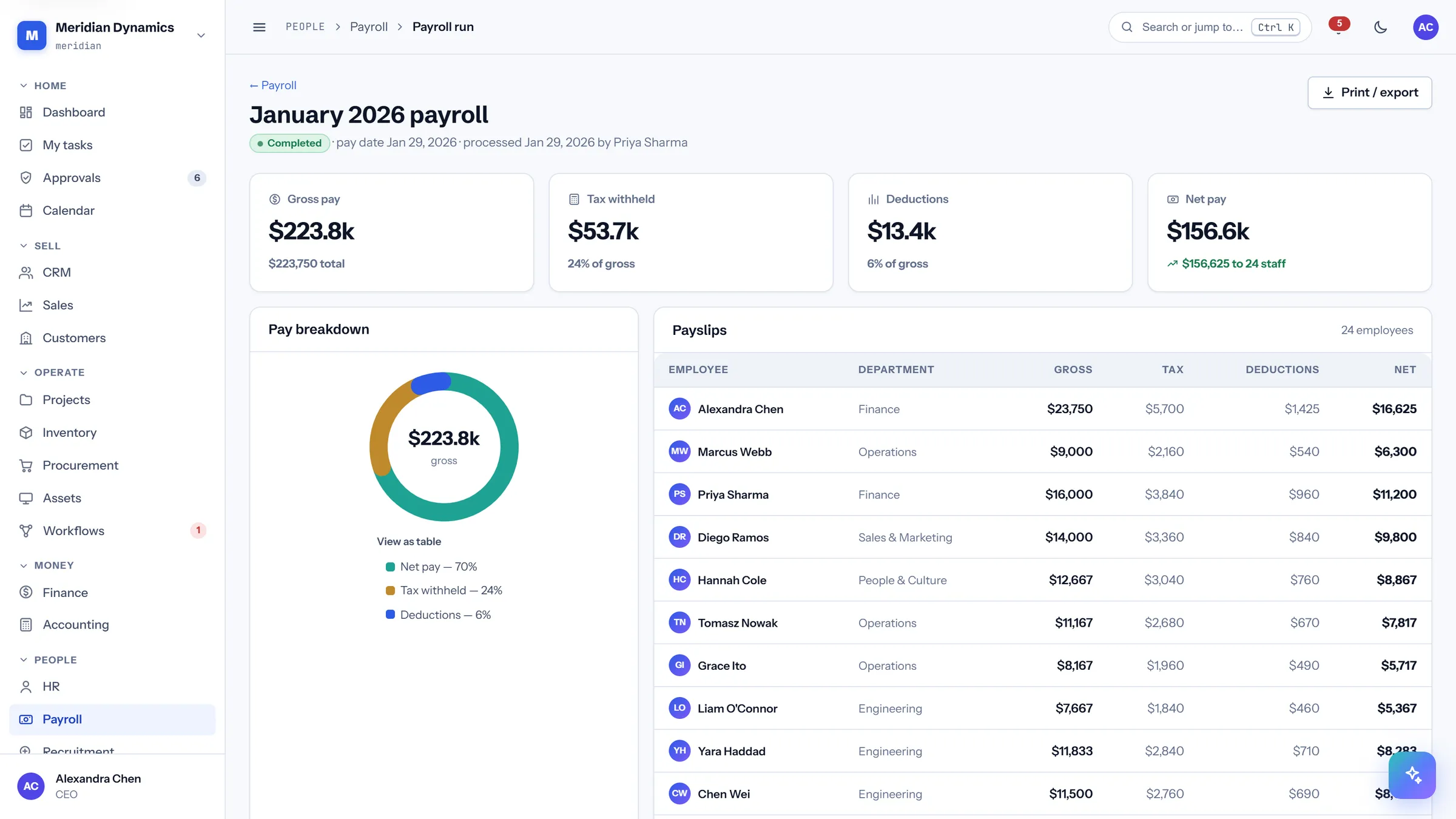
One run broken down: gross, tax withheld, deductions, and net, with a payslip line for every employee paid.
Gross, tax, deductions, and net, with tax shown as a share of gross
Payslip per employee with department
Pay breakdown chart for the run
Completed runs are locked against edits
/app/recruitment
Recruitment
/app/recruitment
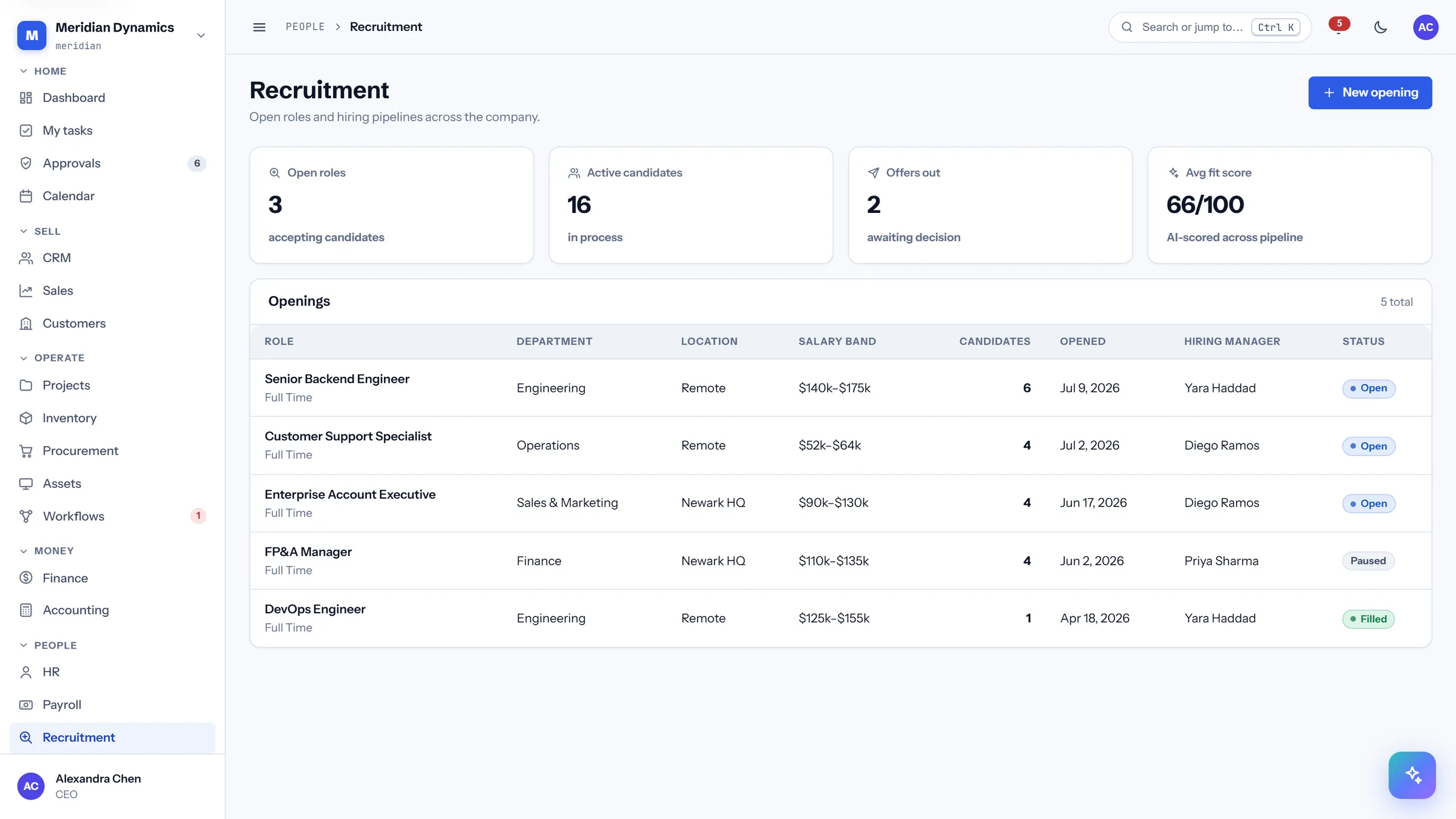
Open roles, candidates in process, and offers outstanding, with a fit score across the pipeline.
Open roles, active candidates, and offers awaiting a decision
Average fit score across the candidate pipeline
Openings with department, location, salary band, and hiring manager
Candidate count per opening
/app/recruitment/openings/{id}
Job opening
/app/recruitment/openings/{id}
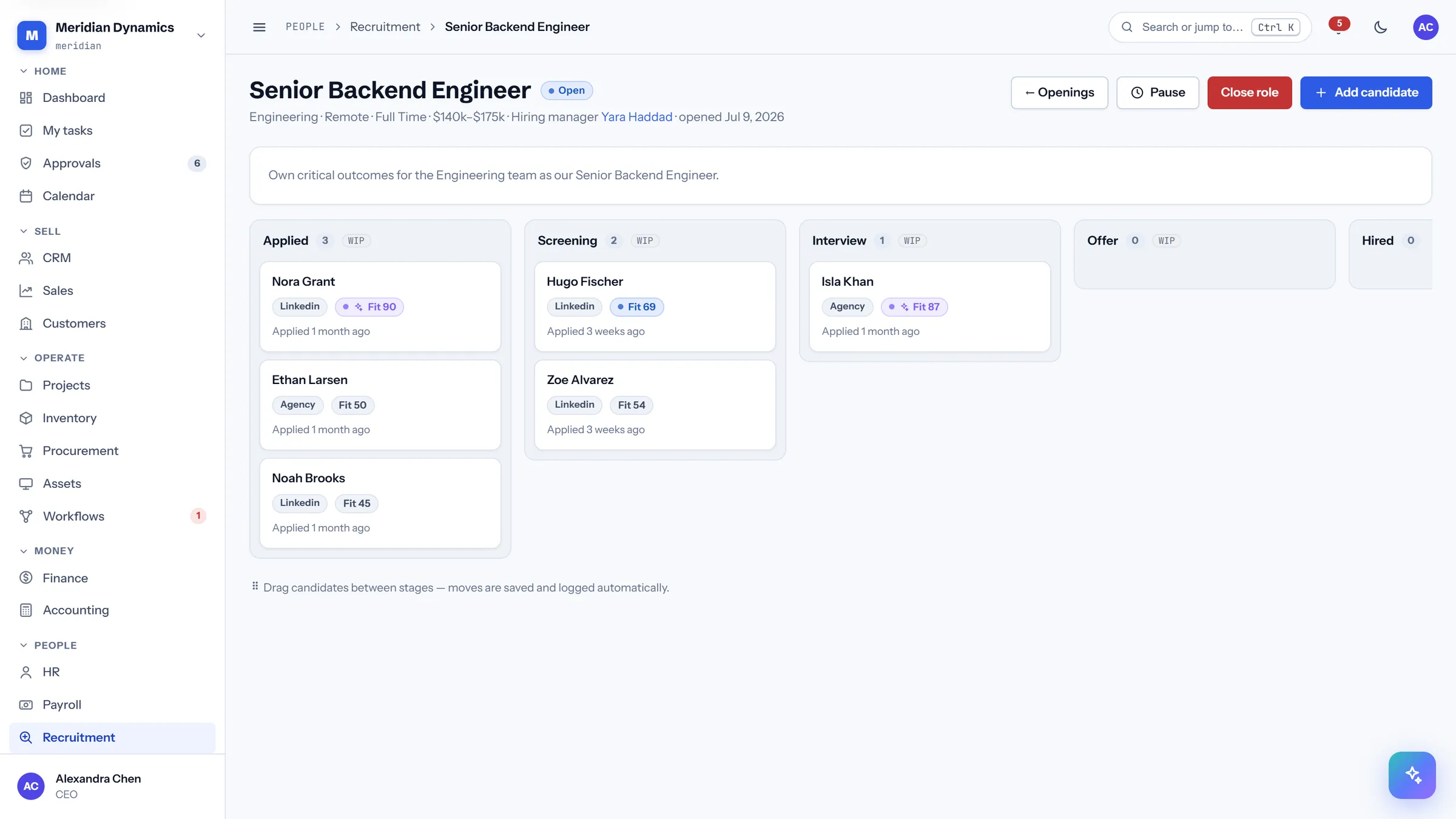
One role with its candidate pipeline, from applied through to offer.
Candidates staged through the hiring process
Fit score per candidate
Salary band and hiring manager held on the role
Status controls whether the role accepts applications
06 · Serve & govern
Serve & govern
The customer-facing and control side: support with sentiment, a knowledge base, the document library with virus scanning, and the contract register.
/app/helpdesk
Helpdesk
/app/helpdesk
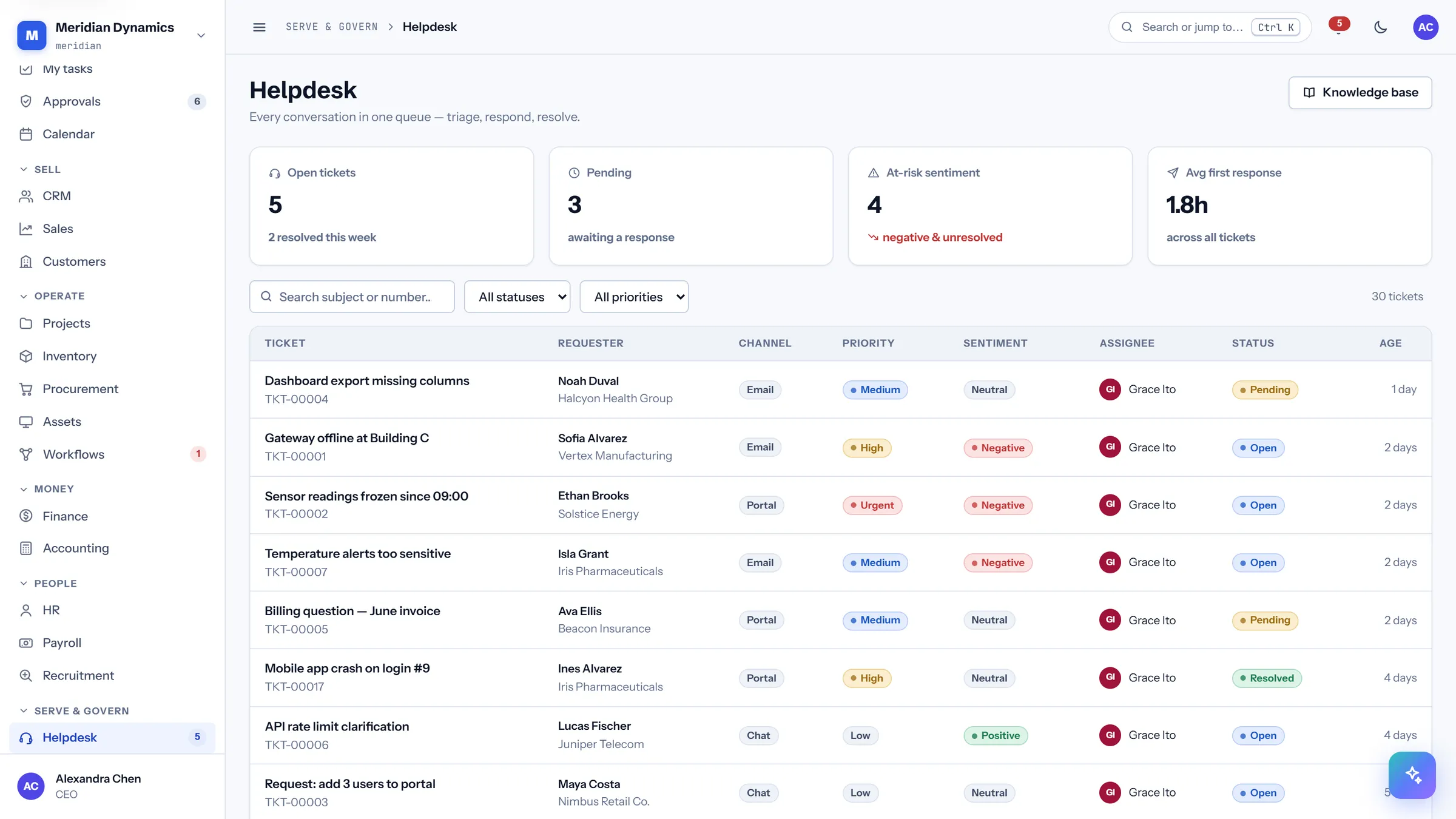
The support queue with sentiment tracked alongside priority, so an unhappy customer is visible even on a low-priority ticket.
Open, pending, and at-risk counts, where at-risk means negative and unresolved
Average first response time across all tickets
Channel, priority, sentiment, assignee, status, and age per ticket
Sortable by age, so nothing quietly rots at the bottom
/app/helpdesk/{id}
Ticket detail
/app/helpdesk/{id}
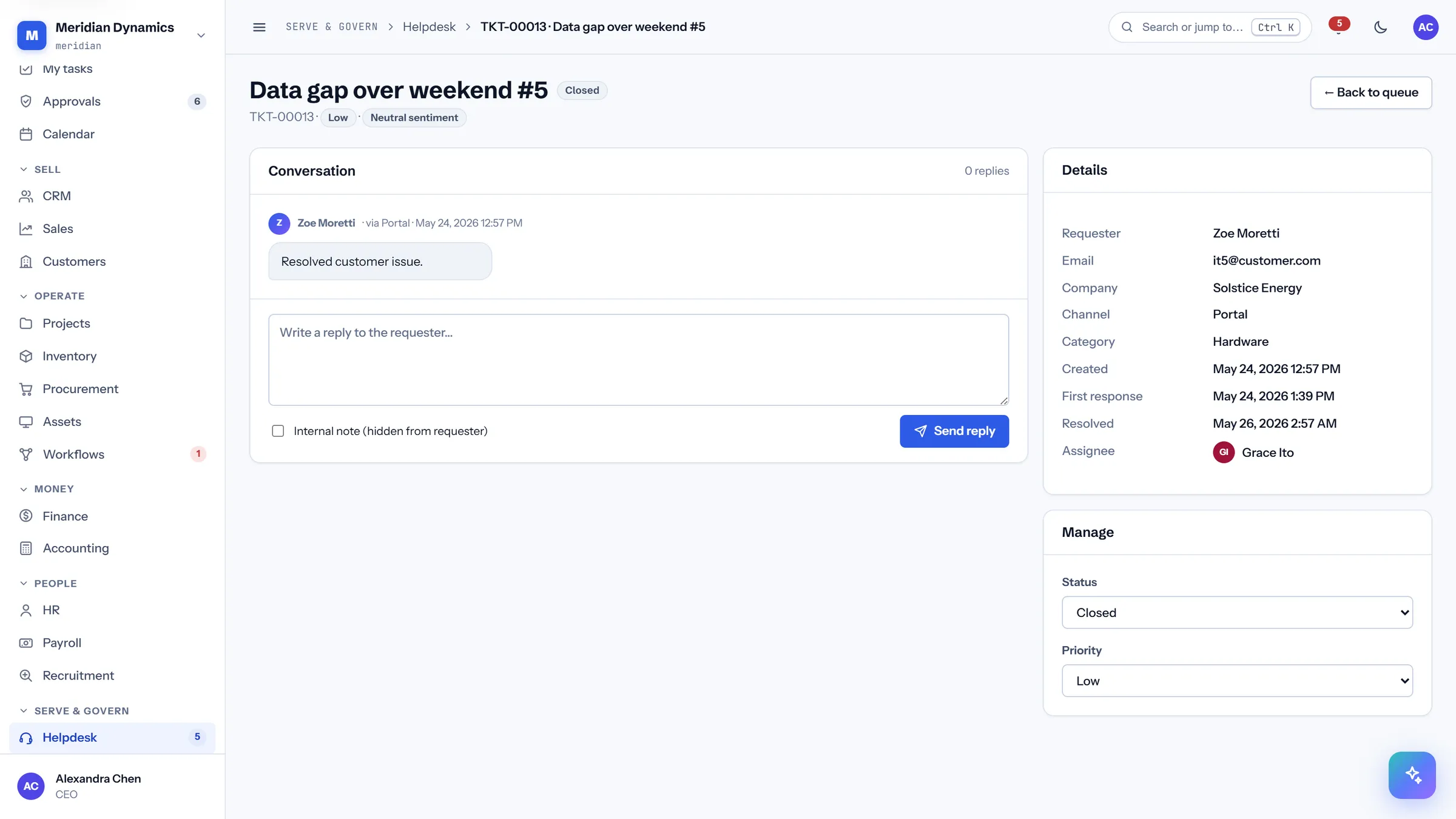
The conversation with the customer, plus the controls to reassign, reprioritise, and resolve.
Full reply thread in order
Requester and account context beside the conversation
Assignment, priority, and status changes in one panel
Resolution recorded against the ticket
/app/kb
Knowledge base
/app/kb
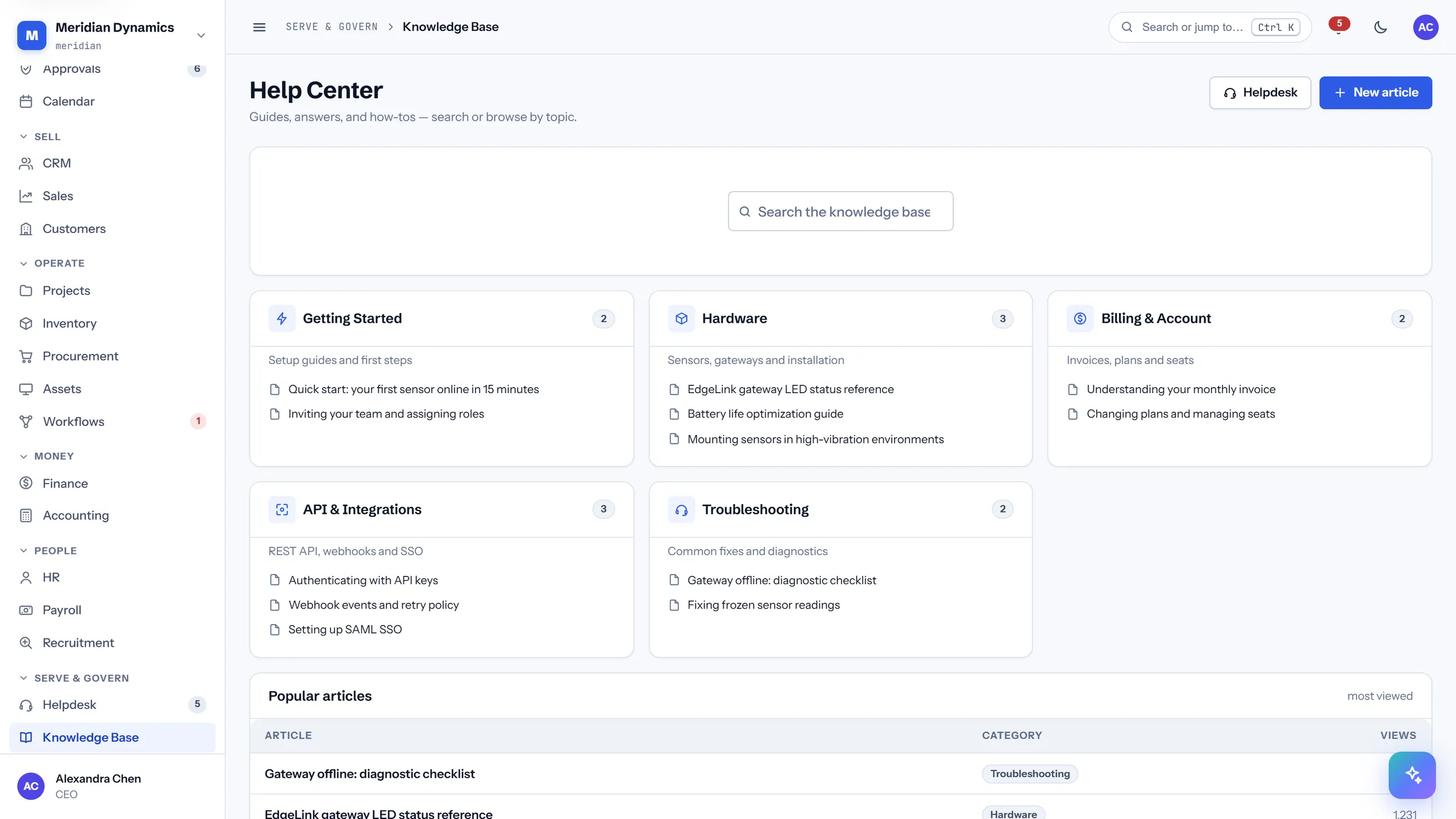
The help centre, organised by category, with the most-read articles surfaced.
Categories covering onboarding, hardware, billing, API, and troubleshooting
Popular articles ranked by views
Searchable from the command palette
Articles are authored in-product
/app/kb/{slug}
Article
/app/kb/{slug}
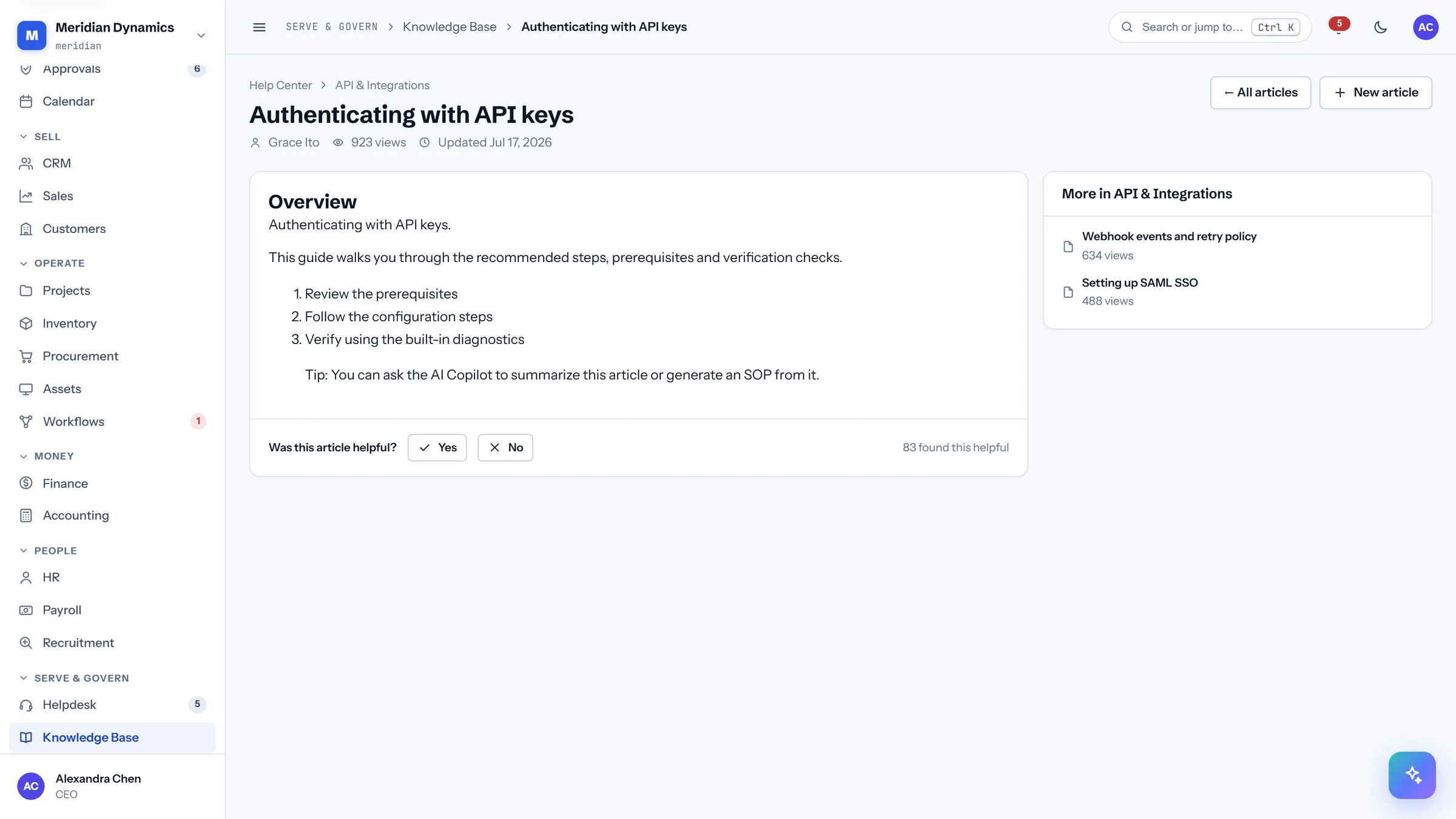
A single article with related reading from the same category.
Readable measure with proper heading structure
Related articles from the same category
View count tracked per article
Linked directly from palette search results
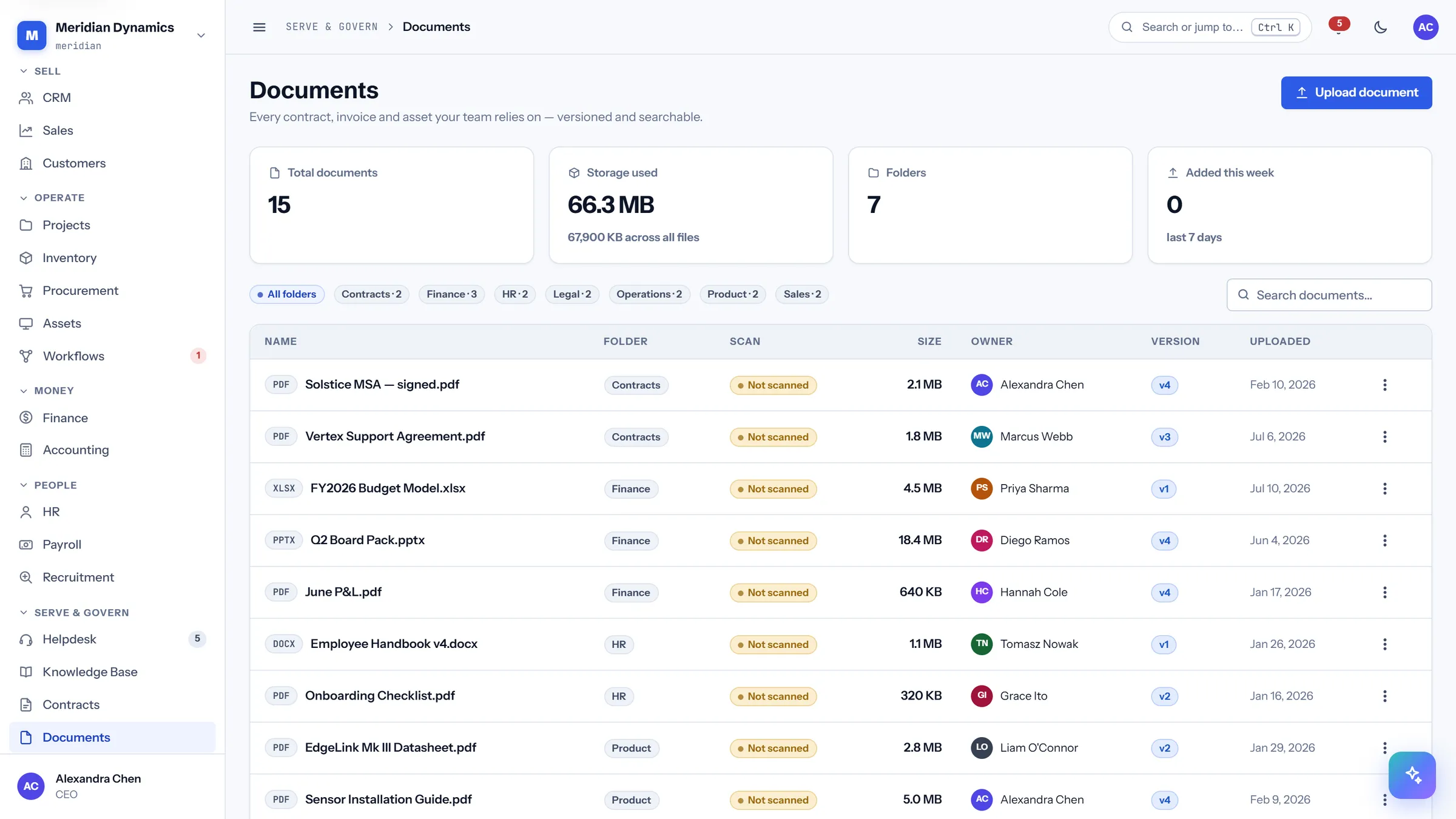
/app/documents
Documents
/app/documents
The file library with folders, versions, and a scan column — every upload is virus-scanned before it is ever stored.
Scan status per file: clean, unscanned, or pending
Files that failed or predate scanning are blocked from download, and the badge explains why
Version number held per document
Storage used and folder counts across the workspace
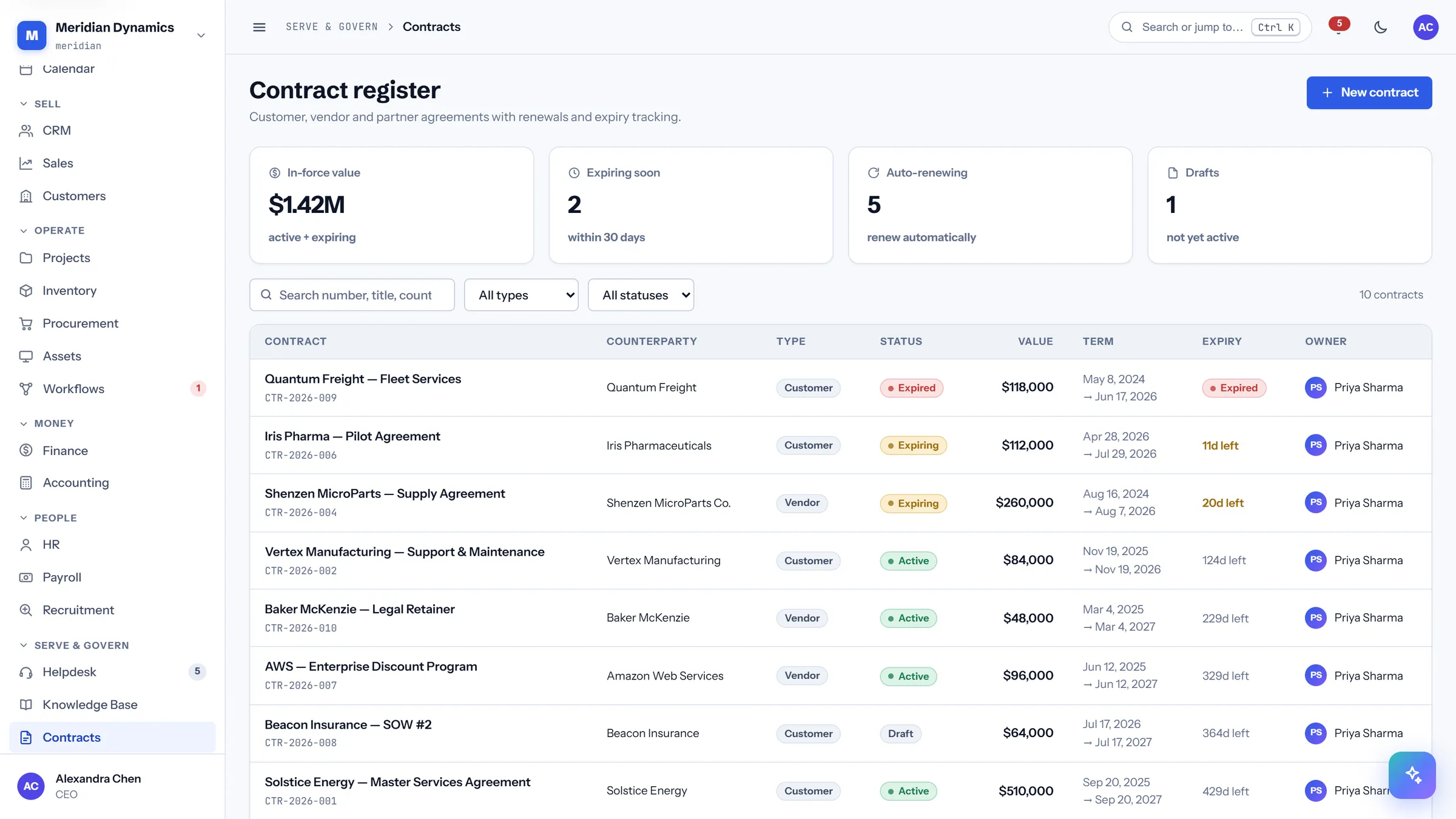
/app/contracts
Contract register
/app/contracts
Agreements with counterparty, value, term, and expiry — so a renewal is a diary entry rather than a surprise.
In-force value across active and expiring agreements
Expiring-within-30-days and auto-renewing counts
Contract type, term, and expiry per row
Owner assigned to each agreement
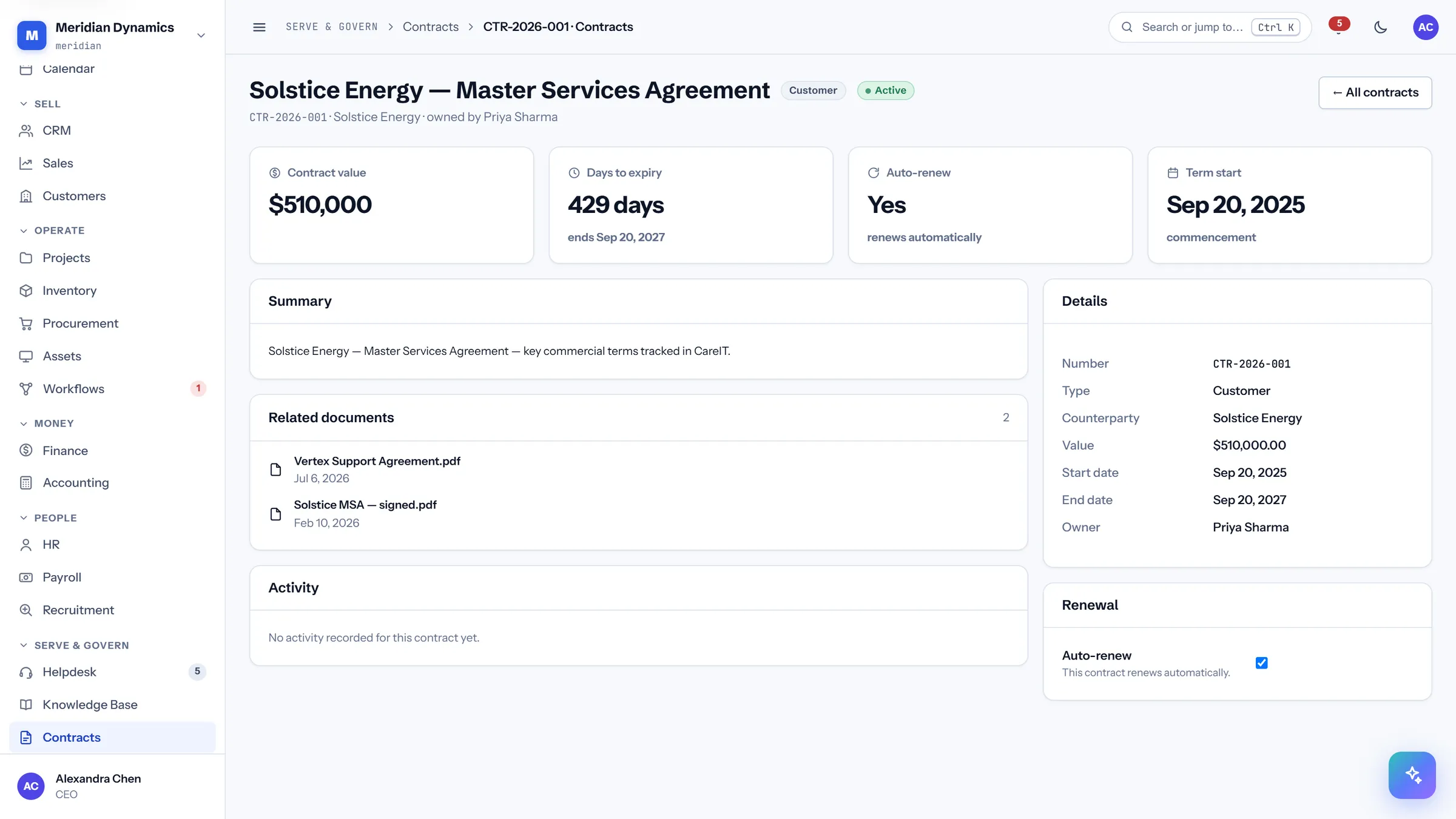
/app/contracts/{id}
Contract detail
/app/contracts/{id}
One agreement: value, term dates, renewal behaviour, related documents, and its activity history.
Contract value with days to expiry and the end date
Auto-renew stated explicitly
Related documents attached to the agreement
Activity trail across amendments and renewals
07 · Workspace & platform
Workspace & platform
The administrative layer: personal and workspace settings, the role permission matrix, the tamper-evident audit log, and the developer platform.
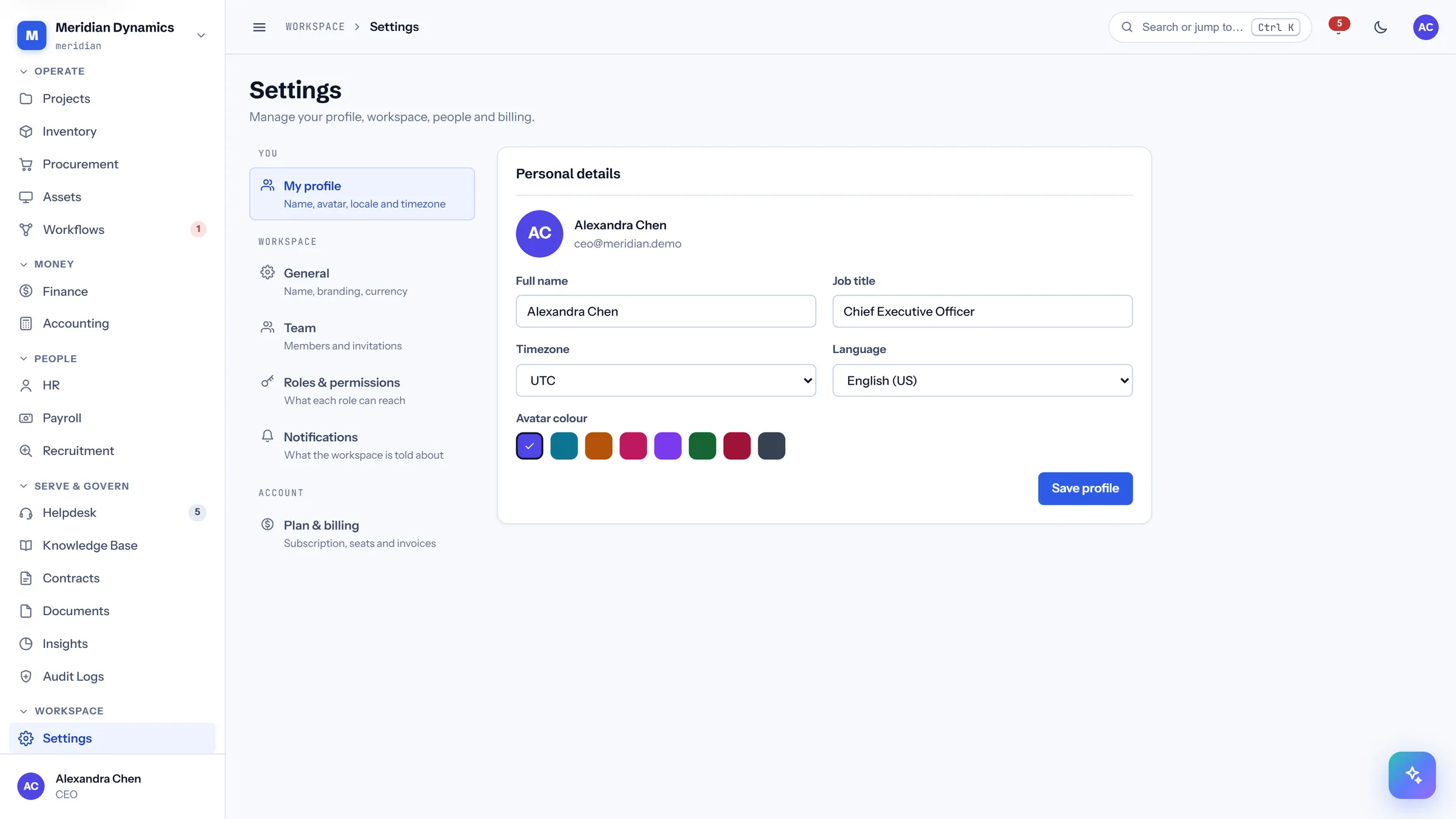
/app/settings/{section}
Settings
/app/settings/{section}
A two-pane settings area with real URLs per section — profile, workspace, team, roles, billing, and notifications — grouped into You, Workspace, and Account.
Every section is its own address, so it can be linked and bookmarked
Multi-factor authentication is enrolled here, with a QR code and segmented one-time-code entry
Password controls include reveal, a caps-lock warning, and a strength meter
Display density is a user preference, not a global setting
/app/settings/roles/{role}
Role permissions
/app/settings/roles/{role}
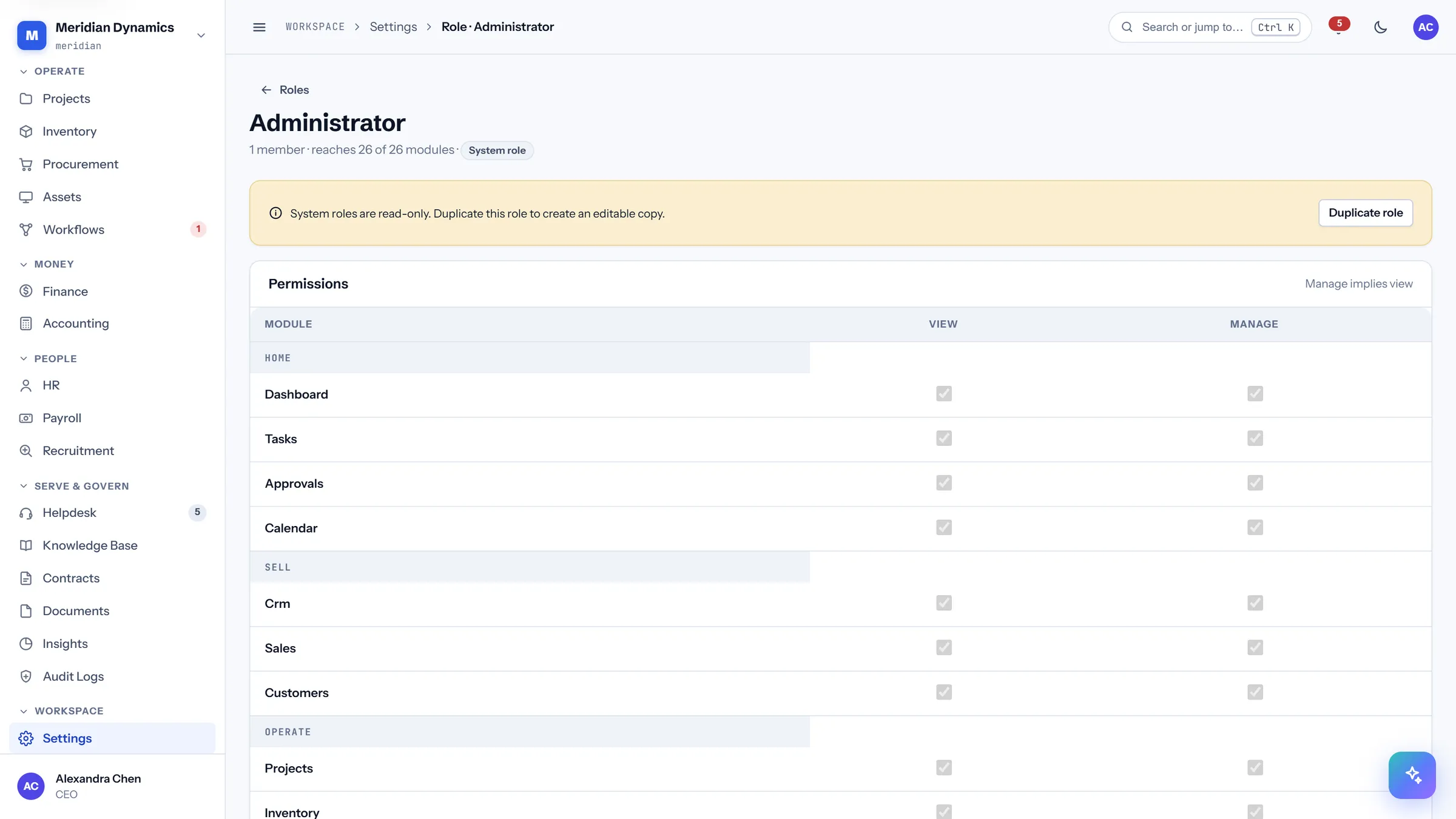
The permission matrix: every module against view and manage, grouped by the same six domains as the sidebar.
Per-domain toggle-all for fast role construction
"Manage implies view" is reflected in the UI before you save, matching how it is stored
System roles are read-only and offer duplication instead
This matrix is also the licensing mechanism — modules are enabled per role
/app/audit
Audit log
/app/audit
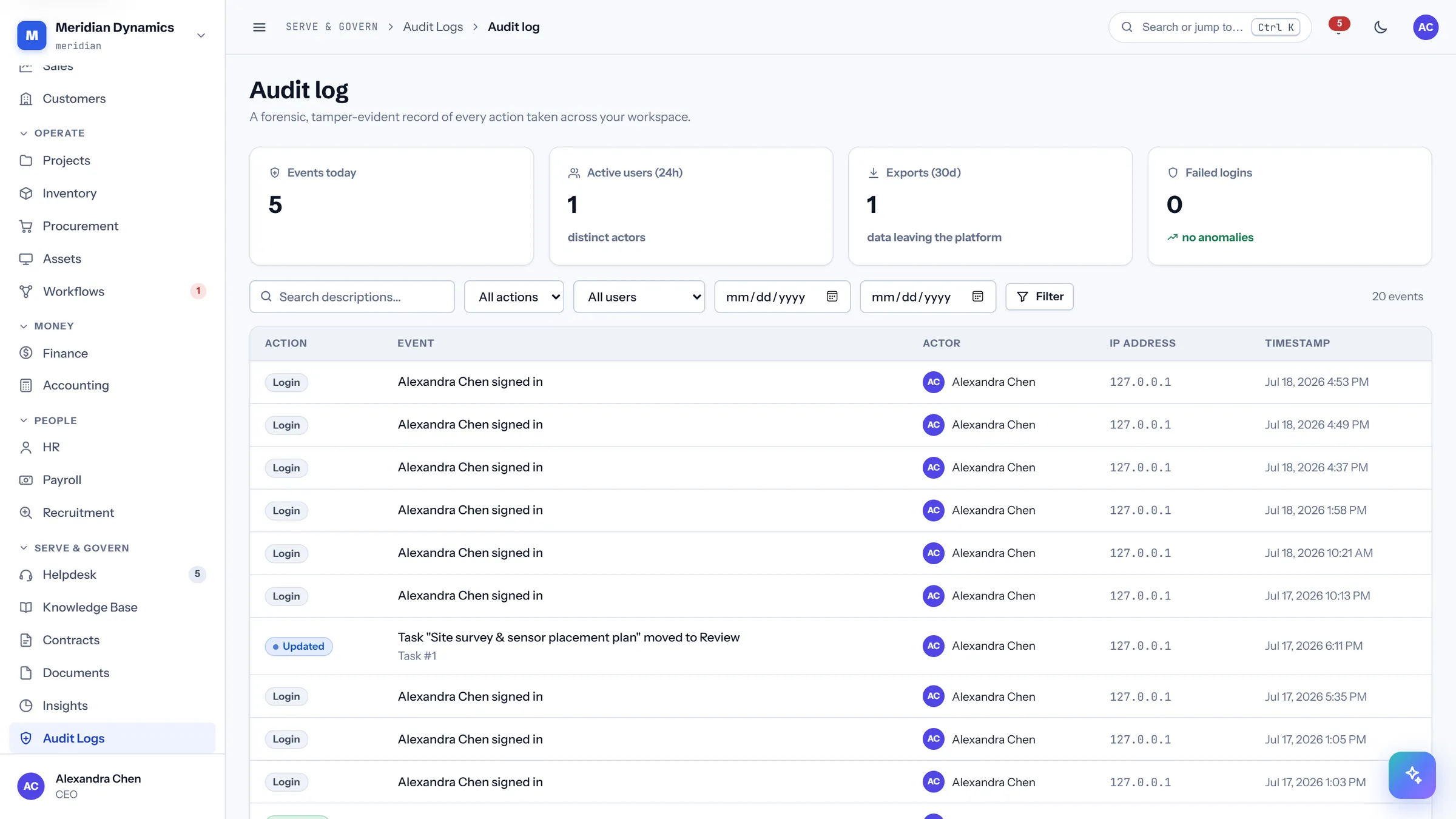
An append-only record of who did what, from where, and when — chained with SHA-256, so tampering is detectable rather than merely discouraged.
Every event carries actor, action, IP address, and timestamp
Records are hash-chained, and a verification command re-walks the chain
Exports are themselves audited — data leaving the platform is an event
Failed login attempts surfaced as an anomaly signal
/app/developer
Developer platform
/app/developer
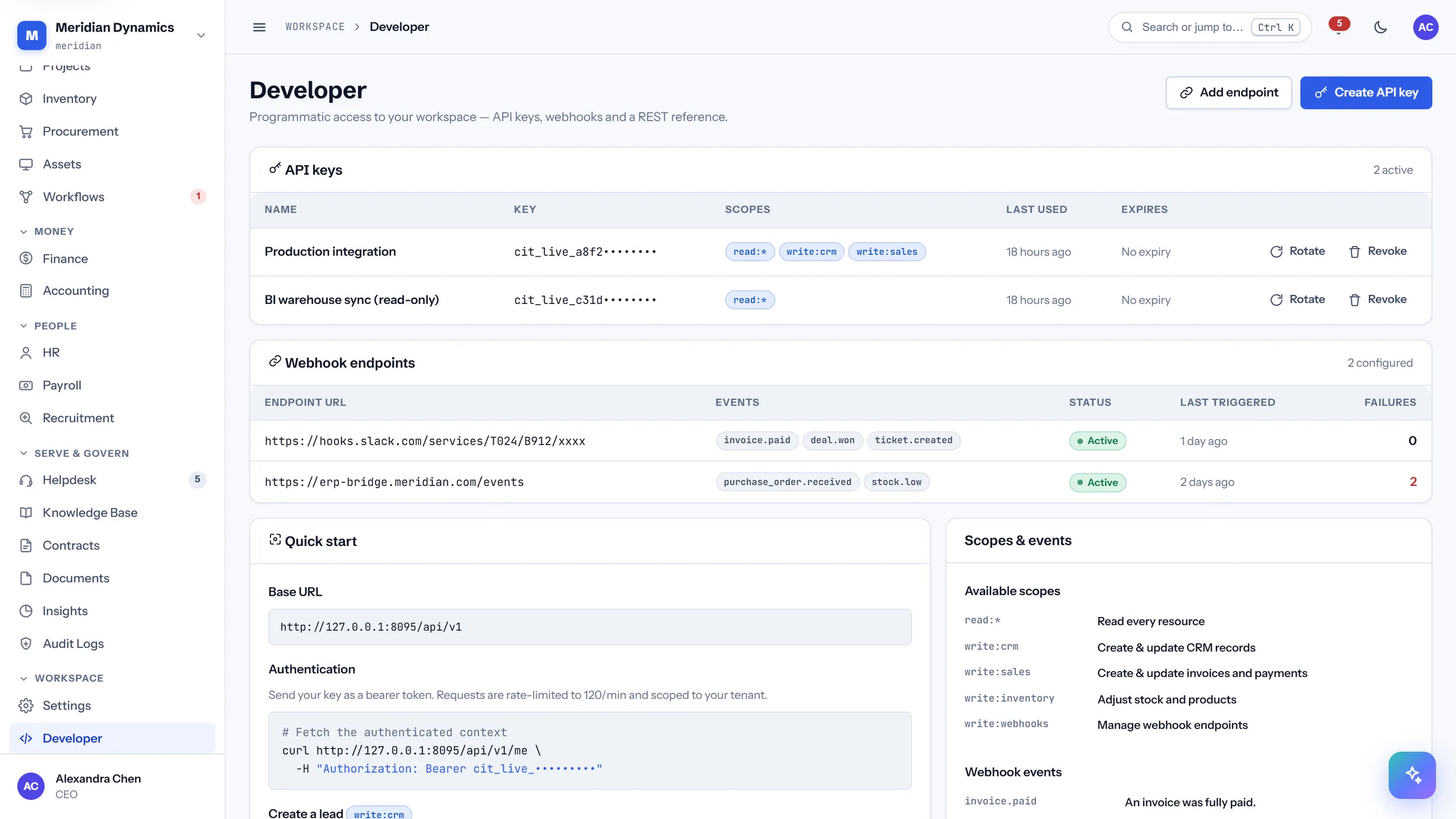
API keys, webhook endpoints, and the quick start — the integration surface, managed from inside the product.
Scoped API keys with last-used and expiry tracking
Webhook endpoints with event selection, delivery status, and failure counts
Webhook secrets are stored encrypted
Write calls require an Idempotency-Key, so a retried request cannot double-post
Seen every screen. Now drive them.
A live walkthrough beats screenshots — we’ll run your company’s own process through the real system.